LLM Observability for FDEs: Tracing and Debugging AI in Production With Langfuse and LangSmith

Key Insights
- Trace before changing prompts: Inspect retrieval results, tool calls, and model outputs to identify the failing step.
- Set measurable baselines: Track latency, token costs, error rates, and task success before optimising.
- Choose tools around your constraints: Compare LangSmith and Langfuse for framework support, hosting, and data control.
- Turn production failures into tests: Save failed traces, test fixes against evaluation datasets, and check for regressions before deployment.
- Automate incident detection: Set alerts for rising errors, latency, and costs, with thresholds based on your application's baseline.
- Protect sensitive traces: Redact personal data, restrict access, and define retention policies before enabling production logging.
LLM applications are harder to debug than traditional software. A request can pass through a prompt, a retrieval system, a model, and several external tools before producing an answer. When something goes wrong, finding the faulty step takes more than checking application logs.
LLM observability helps developers trace these steps, inspect failures, and monitor performance in production.
For Forward Deployed Engineers (FDEs), it is particularly useful when deploying AI systems into client environments with existing infrastructure, changing data, and strict security requirements.
This guide explains the four pillars of LLM observability, compares LangSmith and Langfuse, and shows how to debug production issues using tracing, metrics, and logs.
LLM observability at a glance: LLM observability is the practice of collecting and analysing traces, metrics, and logs from a live AI application. It helps teams investigate failures, track latency and costs, and understand how model calls, retrieval systems, and agent tools behave. LangSmith and Langfuse provide LLM tracing and debugging capabilities, while OpenTelemetry can connect AI telemetry with existing monitoring systems.
FDE salary & ROI calculator
Is FDE training worth it for you?
See what Forward Deployed Engineers with a profile like yours typically earn in India, and how quickly a programme fee is covered.
Indicative ranges based on public, self-reported salary data. Not a prediction or guarantee of your pay.
How this is calculated
- Typical Forward Deployed Engineer pay in India is about ₹10–30 LPA, blended from salaries people report on Glassdoor and Levels.fyi. The middle of the market sits around ₹15–18 LPA; the top quarter reaches about ₹42 LPA.
- Your experience places you in the lower (0–2 years), middle (3–6 years) or upper (7+ years) part of that range.
- Your current role and company type refine where you sit. Roles closer to FDE work rank higher: software engineering, then data/ML, solutions or customer engineering, DevOps/cloud, implementation or IT consulting, QA, and non-engineering roles last. By company type: product or MNC highest, GCC about 5% below that, startups about 7% below GCC, IT services about 10% below startups. That puts GCC about 20% above IT services, in line with reports that GCCs pay up to 20% more.
- Likely first move: moving into a new, AI-heavy role usually brings a bigger raise than a like-for-like job switch, and one move closes part of the gap to the middle of your range. Small gaps close almost fully; large gaps close up to a limit set by your background: up to +55% from product or MNC companies (employers in India expect AI-skilled workers' pay to rise 54%+), +50% from GCCs, +45% from startups and +40% from IT services. Roles further from FDE work reach a smaller share of that limit, from 100% for software engineering down to 72% for non-engineering roles. Everyone below the top of the all-India range gets at least 40% of their limit (it tapers off above your own range), and no estimate goes past the all-India top of ₹30 LPA.
- Fee covered in: the programme fee divided by the extra monthly pay (before tax) from that first move.
Sources
- Glassdoor India: Forward Deployed Engineer salariesAverage total pay ≈ ₹14.6 LPA (base ₹9–18 LPA + about ₹2 LPA variable); highest reported ≈ ₹22 LPA
- Levels.fyi: Forward Deployed Engineer, IndiaMedian ≈ ₹17.6 LPA; 25th percentile ≈ ₹16 LPA; 75th percentile ≈ ₹42 LPA; 90th percentile ≈ ₹46 LPA
- Michael Page India Salary Guide 2026 (reported by Outlook Business)Job-switch raises up to 30% in AI and other high-demand fields; 9.1% market average
- foundit Appraisal Survey 2026 (reported by Business Today)20% expect a 40%+ hike when switching jobs
- AWS, Accelerating AI Skills: Preparing the Asia-Pacific Workforce (reported by Outlook Business)Employers expect AI-skilled workers' salaries to rise 54% or more
- TeamLease Digital, Digital Skills & Salary Primer FY2025 (reported by People Matters)GCCs pay up to 20% more than IT services companies
- IIT Delhi AI Forward Deployed Engineering programme page₹1,65,000 + 18% GST = ₹1,94,700
Keep in mind
- Forward Deployed Engineer is a new title in India, so salary samples are still small.
- Figures are total compensation before tax, not in-hand pay.
- Figures are based on market benchmarks for Forward Deployed Engineer roles across India.
Core Pillars of LLM Observability for FDEs
LLM observability has four main pillars. Each answers a different question about your application.
- Tracing: Where did the request go, and which step failed? Traces follow a request through prompt templates, retrieval, model calls, and tool executions.
- Metrics: How is the application performing? Metrics track latency, Time to First Token (TTFT), token usage, API costs, error rates, and selected quality indicators.
- Logs: What happened during a particular event? Logs record errors, exceptions, and diagnostic details that help investigate failed requests.
- Monitoring and guardrails: Does the system need attention? Alerts flag performance changes, while additional safety checks can detect potential sensitive-data exposure or prompt-injection attempts.
For example, a latency dashboard might show that responses have slowed down. A trace can identify the slow retrieval step, while application logs may help explain the underlying error.
These pillars work best together. Tracing alone does not detect every security risk or incorrect answer, so sensitive-data detection and answer-quality checks may need separate tools.
What should you Trace in a Production LLM Application?
Start with the parts of the workflow that affect reliability, speed, and cost.
| What to trace | Why it matters |
|---|---|
| Prompts and responses | Check what the model received and returned |
| Model calls | Track model selection, token usage, latency, and errors |
| Retrieval (RAG) | Inspect which documents or chunks were retrieved |
| Tool calls | Investigate failed API requests, incorrect arguments, and unexpected outputs |
| Response timing | Find slow model calls, retrieval steps, or external services |
| Token usage and cost | Identify expensive requests and workflows |
| Errors and retries | Investigate timeouts, failed requests, and repeated attempts |
| Request metadata | Filter traces by environment, workflow, model, or request ID |
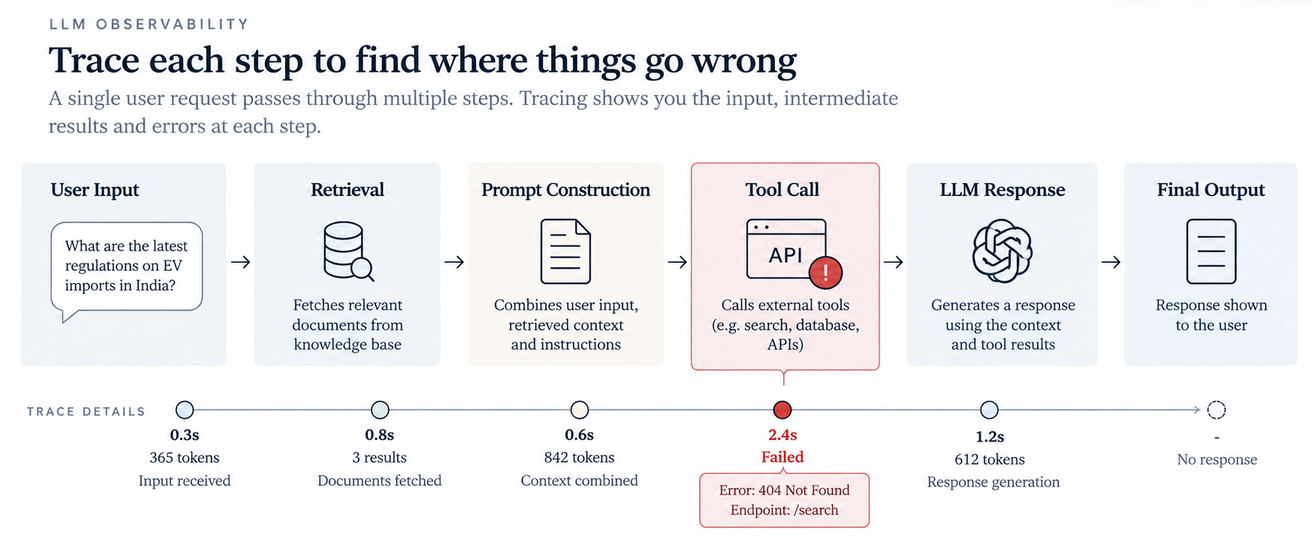
Consider an AI assistant that answers questions using a client's product manuals. It gives an incomplete answer because retrieval returned an outdated document.
Tracing helps you identify the retrieval step as the place to investigate. You can then check the document index and retrieval logic instead of repeatedly changing the prompt.
How should you Handle Sensitive Trace Data?
Production traces may contain personal information, confidential documents, or client data. Decide what to record before enabling detailed tracing.
- Redact sensitive inputs and outputs where possible.
- Restrict access to trace data.
- Set data-retention limits.
- Separate development, staging, and production environments.
- Check data residency and security requirements before choosing a hosted service.
For clients with strict infrastructure requirements, self-hosting may provide greater control over data storage and processing. However, it does not automatically guarantee security or regulatory compliance.
LangSmith vs Langfuse: Which LLM Observability Tool Should You Choose?
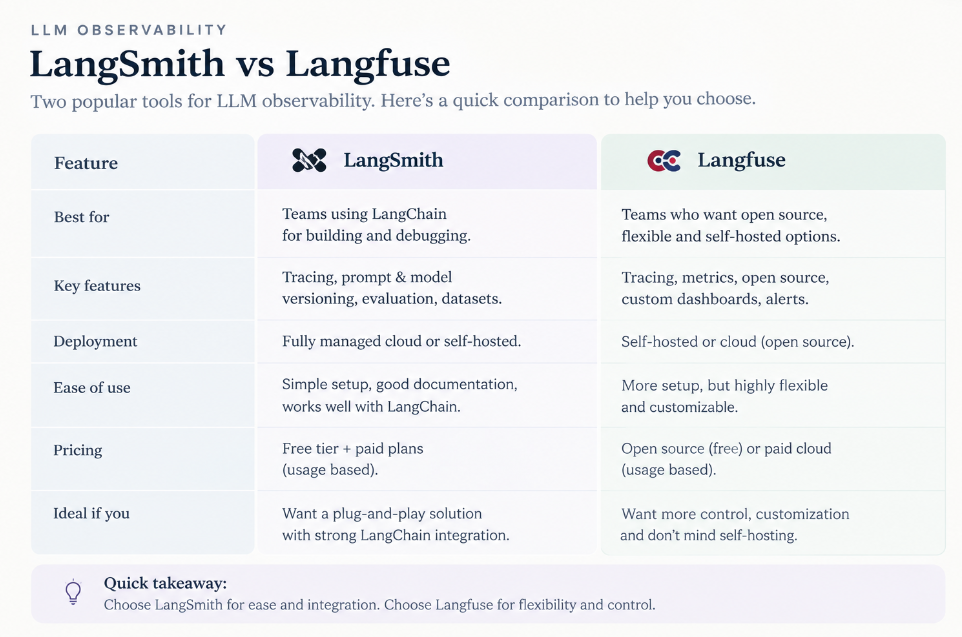
LangSmith and Langfuse both help teams trace and debug LLM applications. The main differences are their development workflows, deployment options, and fit with your existing infrastructure.
| Feature | LangSmith | Langfuse |
|---|---|---|
| Main use | Tracing, debugging, monitoring, and evaluating LLM applications | Tracing, monitoring, prompt management, and evaluation |
| Framework fit | Particularly useful with LangChain and LangGraph | Supports multiple frameworks and model providers |
| Agent debugging | Inspect execution steps, model calls, and tool interactions | Inspect traces, observations, model generations, and tool calls |
| Hosting | Managed platform, with deployment options depending on the offering | Cloud and self-hosted options |
| Open-source option | Not primarily an open-source platform | MIT-licensed open-source core |
| Testing changes | Supports evaluation workflows for prompts and agents | Supports evaluation workflows for assessing outputs and tracking quality |
Product features and deployment options can change, so verify current capabilities before choosing.
When should FDEs Choose LangSmith?
LangSmith is worth considering when your application uses LangChain or LangGraph and you want tracing connected to development and evaluation.
For example, a LangGraph agent may move through several nodes, call external tools, and then generate a response. An execution trace helps you inspect these steps and locate a failed tool call or slow stage.
LangSmith's evaluation workflows can also help you test prompt and agent changes against defined test cases, making it easier to check for regressions.
When should FDEs Choose Langfuse?
Langfuse is worth considering when you want an open-source observability platform, need self-hosting options, or work across different LLM frameworks.
Its self-hosted deployment options can suit clients that need observability data to remain within their own infrastructure. Langfuse also documents support for fully offline and air-gapped deployments.
An air-gapped environment still requires careful planning for dependencies, updates, storage, networking, and model access.
Important: Self-hosting does not automatically make a deployment HIPAA- or GDPR-compliant. Compliance depends on the full system, including security controls, data handling, access policies, and organisational procedures.
Can you Use OpenTelemetry with Existing Enterprise Monitoring Tools?
Yes, with compatible instrumentation and exporters.
Many enterprises already use application performance monitoring (APM) platforms such as Datadog, Splunk, or New Relic. OpenTelemetry (OTel) provides a standard way to collect and export telemetry, allowing teams to connect LLM traces with existing application monitoring.
OpenLLMetry, developed by Traceloop, is one option for instrumenting LLM applications using OpenTelemetry.
This is useful when a slow AI response could involve several systems. You may need to investigate a model call, a retrieval service, and a backend API to understand where the delay originates.
Integration support depends on the instrumentation, exporter, and target platform. Check compatibility, trace correlation, and data-redaction options before routing production telemetry.
How to Set Up LLM Tracing in Production
The exact setup depends on your framework and observability tool, but the process generally follows these steps.
- Choose a workflow. Start with one important application, such as a customer support assistant or RAG-based search system.
- Create a project. Set up a project in LangSmith or Langfuse, keeping development and production environments separate.
- Install the SDK. Follow the official setup instructions and configure credentials securely.
- Instrument key steps. Trace model calls, retrieval, external APIs, and agent tool executions.
- Add metadata. Include useful fields such as environment, workflow, model, and request ID. Avoid storing secrets in metadata.
- Test failure cases. Simulate timeouts and unsuccessful tool calls to check whether the traces capture useful diagnostic details.
- Review privacy and overhead. Configure redaction and sampling where appropriate, and measure tracing's impact on performance.
- Deploy and monitor. Watch for missing traces, increased latency, unexpected costs, and logging errors.
Setup guides: LangSmith and Langfuse.
Start small and expand once you know the traces are useful. Recording more data is not the goal. Recording the right data is.
LLM Monitoring: Metrics, Dashboards and Alerts
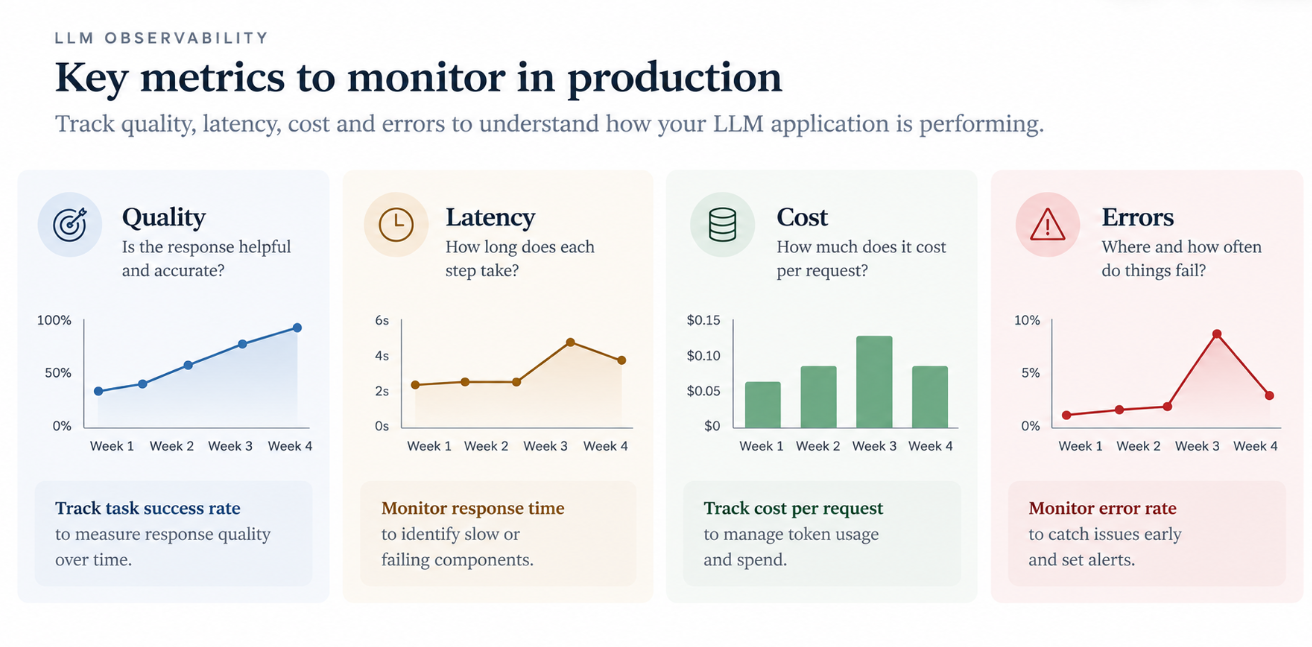
Tracing helps you investigate individual requests. LLM monitoring helps you spot patterns across requests.
| Metric | What it tells you |
|---|---|
| Time to First Token (TTFT) | How long users wait for the first streamed token |
| End-to-end latency | How long the complete request takes |
| Token throughput | How quickly tokens are generated |
| Error rate | How often requests fail |
| Token usage and cost | Whether usage or spending is increasing |
| Retrieval signals | Whether relevant context is being retrieved |
| Tool-call failures | Whether agents are struggling to use external tools |
| Answer-quality signals | Whether outputs meet defined criteria |
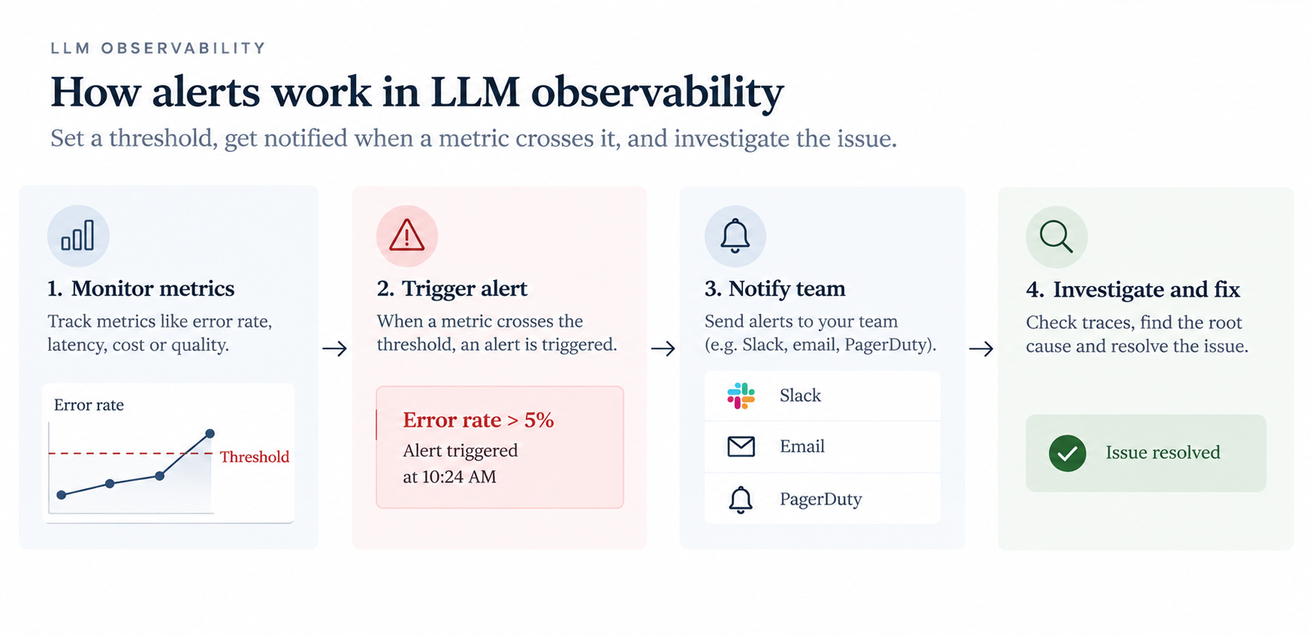
An LLM observability dashboard brings these signals together. You can configure alerts for rising error rates, slower responses, or unexpected spending.
Set thresholds based on your application's normal performance and user expectations. A short classification task and a multi-step research agent will not have the same latency requirements.
Keep performance and quality separate, too. A fast response is not necessarily a correct one.
How to Debug LLM Failures in Production
When a production issue appears, use the trace to narrow down the problem before changing the application.
- Find the request. Use the request ID, timestamp, or workflow metadata.
- Inspect the trace. Check the prompt, retrieved context, model output, tool calls, and recorded errors.
- Compare requests. Look for differences between a failed request and a similar successful one.
- Test a fix. Change the relevant component and test the failed case alongside similar scenarios.
Example: An AI Assistant Gives Incomplete Answers
A client updates its internal product manuals. Soon after, the AI assistant starts omitting important details from its answers.
The trace shows the following:
| Evidence | Next step |
|---|---|
| The user question is recorded correctly | Check later stages of the workflow |
| Retrieval returns an outdated document | Inspect the index and document-selection logic |
| The model receives incomplete context | Check how retrieved information is passed to the model |
| The final answer misses key details | Test whether correcting retrieval fixes the answer |
The likely place to investigate is the document ingestion or retrieval process. After making a change, test the same questions again and compare the results.
The trace points you towards the problem, but you still need to confirm the cause before deciding on a fix.
Common LLM Production Problems
Common production issues often stem from slow model calls, rising API costs, outdated retrieval results, failed tool calls, inconsistent answers, or missing traces.
| Symptom | What to check |
|---|---|
| Slow responses | Model latency, retrieval, external APIs, and repeated calls |
| High API costs | Token usage, long prompts, retries, and unnecessary model calls |
| Incomplete answers | Retrieved context, prompt construction, and output handling |
| Failed agent actions | Tool arguments, API responses, permissions, and timeouts |
| Inconsistent answers | Input differences, retrieved documents, model settings, and conversation history |
| Missing traces | Instrumentation, sampling, SDK configuration, and export errors |
How FDEs Use LLM Observability in Production
For FDEs, deployment is only the beginning. Client data changes, integrations fail, and real users introduce cases that may not have appeared during testing.
Observability helps you manage these changes by letting you:
- Set a baseline: Record normal latency, error rates, token usage, and costs.
- Investigate client-specific issues: Identify whether failures involve data, retrieval, integrations, or model behaviour.
- Track deployments: Compare traces before and after changes.
- Prevent regressions: Turn recurring failures into test cases.
- Work within enterprise constraints: Connect AI telemetry to existing monitoring or choose a deployment model suited to the client's requirements.
Observability and evaluation serve different purposes. Observability helps explain what happened during real requests. Evaluation checks outputs against defined criteria. Together, they help you investigate failures and verify improvements.
Conclusion
In production, knowing how to build an LLM application is only half the job. You also need to evaluate its answers, trace failures, control costs, and make it reliable in a real business environment.
If you want to move from experimenting with AI tools to building and deploying complete AI systems, explore the IIT Delhi Advanced Certificate in AI Forward Deployed Engineering. The programme includes 145 hours of learning, five capstone builds, four mini-capstones, and a production deployment, with practical work across RAG, AI evaluation, enterprise integration, and deployment.
For engineers looking to move into a field that brings AI development closer to real business problems, this is a chance to build more than theoretical knowledge. You'll have projects to build, systems to deploy, and practical work to show for it.
FAQs
1. What is the difference between LLM tracing and LLM monitoring?
LLM tracing follows an individual request through model calls, retrieval, and tool executions. LLM monitoring tracks performance across requests using metrics and alerts.
2. Is LangSmith or Langfuse better for production debugging?
LangSmith is worth considering for LangChain and LangGraph workflows. Langfuse offers an open-source core and self-hosting options. The better choice depends on your framework, infrastructure, and operational needs.
3. Can Langfuse run in an air-gapped environment?
Langfuse documents support for offline and air-gapped self-hosted deployments. Check its current documentation for deployment requirements, dependencies, and maintenance considerations.
4. Does self-hosting guarantee HIPAA or GDPR compliance?
No. Self-hosting gives you more control over infrastructure and data handling, but compliance also depends on security controls, data processing, access policies, and organisational practices.
5. Can OpenTelemetry send LLM traces to Datadog, Splunk, or New Relic?
It can, where compatible instrumentation, exporters, and platform integrations are available. Check the target platform's documentation before implementing the connection.
6. Which LLM metrics should you monitor first?
Start with end-to-end latency, error rate, token usage, and cost. Add TTFT, retrieval signals, tool-call failures, and answer-quality checks when they are relevant to your application.
7. Does LLM tracing affect application performance?
It can add overhead depending on the SDK, data volume, and export method. Test the impact and consider sampling or asynchronous export where appropriate.
8. Can production traces become regression tests?
Yes. Use useful traces to build test cases based on real failures. Remove sensitive information and define what a correct result should look like before using them for testing.
9. How do you protect sensitive data in LLM traces?
Redact sensitive fields, restrict access, set retention limits, and review data residency requirements. Choose hosted or self-hosted deployment based on the client's security needs.
10. Should development and production traces be separated?
Usually, yes. Separate environments make it easier to compare test activity with live traffic and apply appropriate access controls.