Warehouse Automation: Technologies, Levels & How AI Runs the Modern Warehouse

Key Insights
- Automation is a spectrum. Warehouses progress through five practical levels: manual, mechanized, automated, integrated and intelligent. Many sit between two levels.
- Five technology groups do the work. These are conveyors and sorters, automated storage and retrieval systems (AS/RS), mobile robots (AMRs and AGVs), warehouse management and control software (WMS and WCS), and identification tools such as barcodes, RFID and computer vision.
- AMRs and AGVs differ in navigation. AMRs plan their own paths and route around obstacles. AGVs typically follow predefined routes.
- Software connects the equipment. The WMS manages inventory, orders and tasks. The WCS coordinates automated equipment in real time.
- AI is an intelligence layer, not a replacement. It supports demand forecasting, inventory optimization, task assignment, route planning and predictive maintenance on top of existing automation.
- The value comes from connection. Automation links receiving, storage, picking, sorting, packing and dispatch into one coordinated workflow.
- Benefits come with real costs. Automation can raise throughput, accuracy and safety, but it needs investment in equipment, software, integration and training.
- People stay essential. Workers handle exceptions, oversight, maintenance and unpredictable situations. A lights-out warehouse is rarely the goal.
- Applications vary by setting. E-commerce, retail distribution, manufacturing and cold storage each use automation for different priorities.
- Cost, timeline and ROI depend on the operation. Warehouse size, complexity, chosen technologies, integration needs and throughput all shape the answer.
Warehouse automation is the use of technology, equipment and software to automate warehouse processes such as receiving, storage, picking, sorting and order fulfillment. It ranges from conveyors and barcode scanning to robotics, automated storage and AI-powered decision-making.
Four points shape how it works in practice:
- It is a spectrum. Warehouses automate in stages, from mechanized handling to connected, AI-driven operations.
- It pairs equipment with software. Conveyors, storage systems and robots move goods, and warehouse software directs them.
- It supports people. Automation takes on repetitive or physically demanding tasks, while workers handle oversight and exceptions.
- AI adds intelligence. AI helps with forecasting, inventory optimization, route and task planning, and day-to-day decisions.
This guide covers the main warehouse automation technologies, the levels of automation and how AI is changing warehouse operations, from receiving through to dispatch.
What Technologies are Used in Warehouse Automation?
Warehouse automation technologies fall into two groups: equipment that moves, stores and identifies goods, and software that directs that equipment.
Five technology groups appear in most automated warehouse operations.
Conveyors and Automated Sorting Systems
Conveyors move cartons, totes and pallets between warehouse areas. Automated sortation systems then identify each item and divert it to the correct lane, chute or dock door.
Together they cut manual transportation and keep orders moving toward fulfillment.
Automated Storage and Retrieval Systems (AS/RS)
An automated storage and retrieval system (AS/RS) uses cranes, shuttles or robots to store inventory in designated locations and retrieve it on request.
Tall, dense racking improves space utilization. Goods arrive at a pick station, which gives fast, controlled inventory access.
Autonomous Mobile Robots (AMRs) and Automated Guided Vehicles (AGVs)
Both are driverless vehicles that move goods, but they navigate differently. The table compares them on the points that matter when choosing between the two.
| Aspect | AMRs | AGVs |
|---|---|---|
| Navigation | Plan their own paths using sensors and maps | Typically follow predefined routes or guidance systems |
| Obstacles | Can route around them | Usually stop until the path clears |
| Best fit | Changing layouts and shared spaces | Fixed, repeatable routes |
Both support material movement, picking and replenishment. They either bring goods to a worker (goods-to-worker) or assist pickers who walk to the shelves (worker-to-goods).
Warehouse Management Systems and Warehouse Control Systems
Physical automation depends on a software layer. Two systems do most of that work, and the table shows how their roles differ.
| System | Role | Works with |
|---|---|---|
| WMS | Manages inventory, orders and warehouse operations | People, processes and business systems |
| WCS | Coordinates and controls automated equipment in real time | Conveyors, sorters, AS/RS and robots |
The WMS decides what needs to happen. The WCS turns those instructions into equipment movements and reports the results back.
Computer Vision and Automated Identification
Automation only works when the system knows what each item is and where it is. Cameras, barcode scanners and RFID readers capture this without manual entry. GS1 identification and barcode standards support consistent product identification across receiving, storage, picking and dispatch.
These tools support four tasks:
- Identifying products at receiving and picking
- Tracking inventory as it moves between locations
- Verifying the right item and quantity
- Detecting errors such as mislabeled or mis-sorted items
What are the Levels of Warehouse Automation?
Warehouse automation is not an all-or-nothing change. Most operations add capability in stages, and a practical way to describe that progression is in five levels:
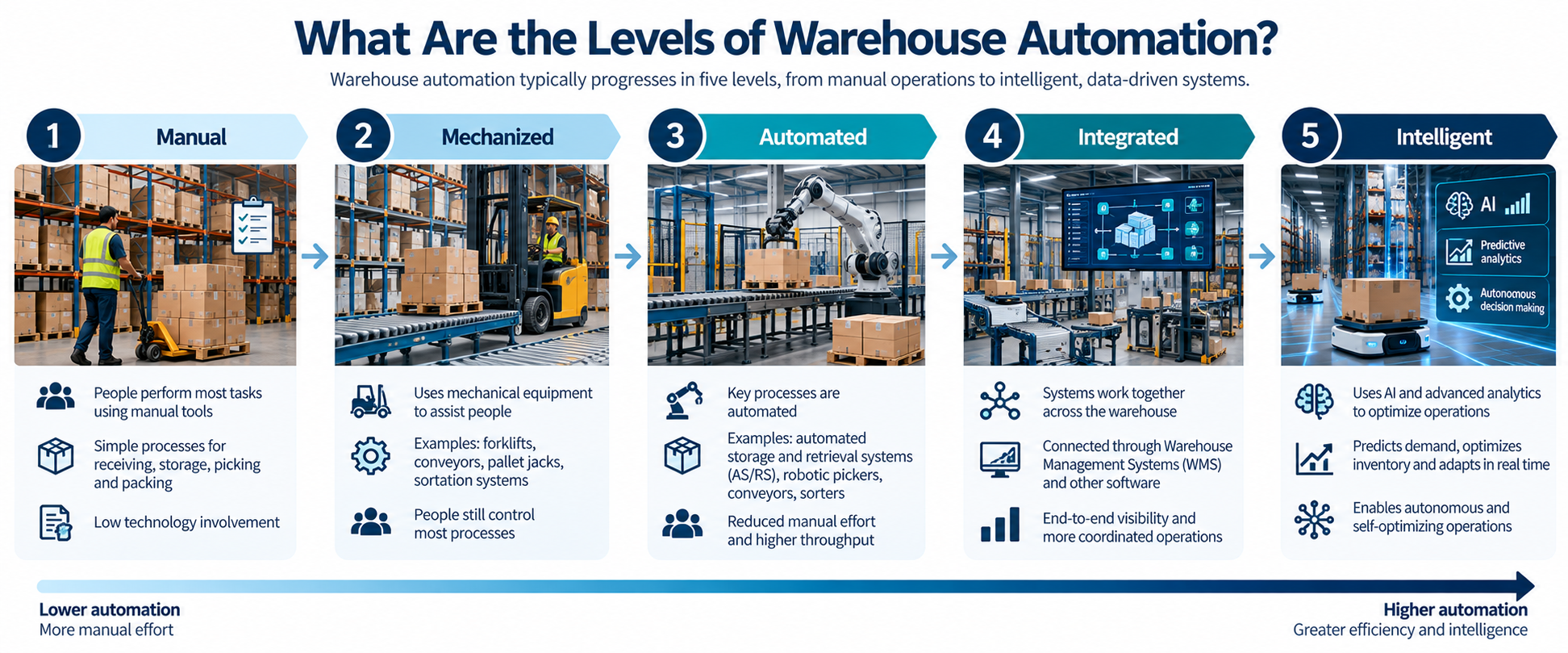
This is a working framework, not a formal industry standard, and many warehouses sit between two levels.
Level 1: Manual Warehouse Operations
Most activities depend on people and basic tools. Workers pick by hand and move goods with carts or hand trucks.
Records are kept on paper or in spreadsheets, so speed and accuracy depend heavily on the individual.
Level 2: Mechanized Warehouse Operations
Equipment assists workers without controlling the process. Conveyors, forklifts, pallet jacks and basic sortation equipment reduce physical effort.
An operator still directs each task and makes each decision.
Level 3: Automated Warehouse Operations
Systems begin performing specific tasks automatically. Examples include AS/RS, automated sorting, automated picking, and AMRs or AGVs.
Each system often runs as a separate island, so handoffs between them may still be manual.
Level 4: Integrated Warehouse Automation
Multiple automated systems work together through connected software. The WMS is integrated with warehouse control systems and robotics.
Real-time inventory data flows across the operation and triggers automated workflows without manual handoffs.
Level 5: Intelligent and AI-Driven Warehouses
AI adds decision-making and optimization on top of integrated automation. This includes demand forecasting, inventory optimization, dynamic task allocation, predictive maintenance and route optimization.
Higher levels do not simply mean more machines. Each step brings systems that are better connected and more able to coordinate, optimize and decide.
How Does AI Run the Modern Warehouse?
AI does not replace warehouse automation. It acts as an intelligence layer that uses operational data to help automated systems make better decisions and adapt to changing conditions.
Most applications of AI in warehouse automation follow the same loop:
How far that loop runs without human approval depends on data quality, system integration and the application.
AI for Demand Forecasting
AI analyzes historical orders alongside real-time signals such as current sales and promotions. It estimates future demand, seasonal changes and product-level demand patterns.
Those forecasts become inventory requirements, so stock and space can be planned ahead.
AI for Inventory Optimization
AI can help determine what inventory to store, where to position it and when to replenish.
Fast movers can be slotted near pick stations, while slow movers are flagged to reduce excess inventory.
AI for Picking and Task Assignment
AI can prioritize and assign tasks continuously instead of working through a fixed queue. Each task goes to the worker or robot best placed to complete it, based on:
- Order urgency
- Product location
- Worker availability
- Robot availability
- Warehouse conditions, such as congestion
AI for Route and Workflow Optimization
Once tasks are assigned, AI can optimize how they are carried out. It plans robot movement and picking routes, and sequences orders.
It also balances material flow and warehouse traffic, so robots and people do not create bottlenecks.
AI for Predictive Maintenance
AI can analyze equipment data such as vibration, temperature and cycle times to spot early signs of failure.
Conveyor abnormalities, declining robot performance and motor or mechanical problems can then be fixed before they disrupt operations.
How Does Warehouse Automation Work?
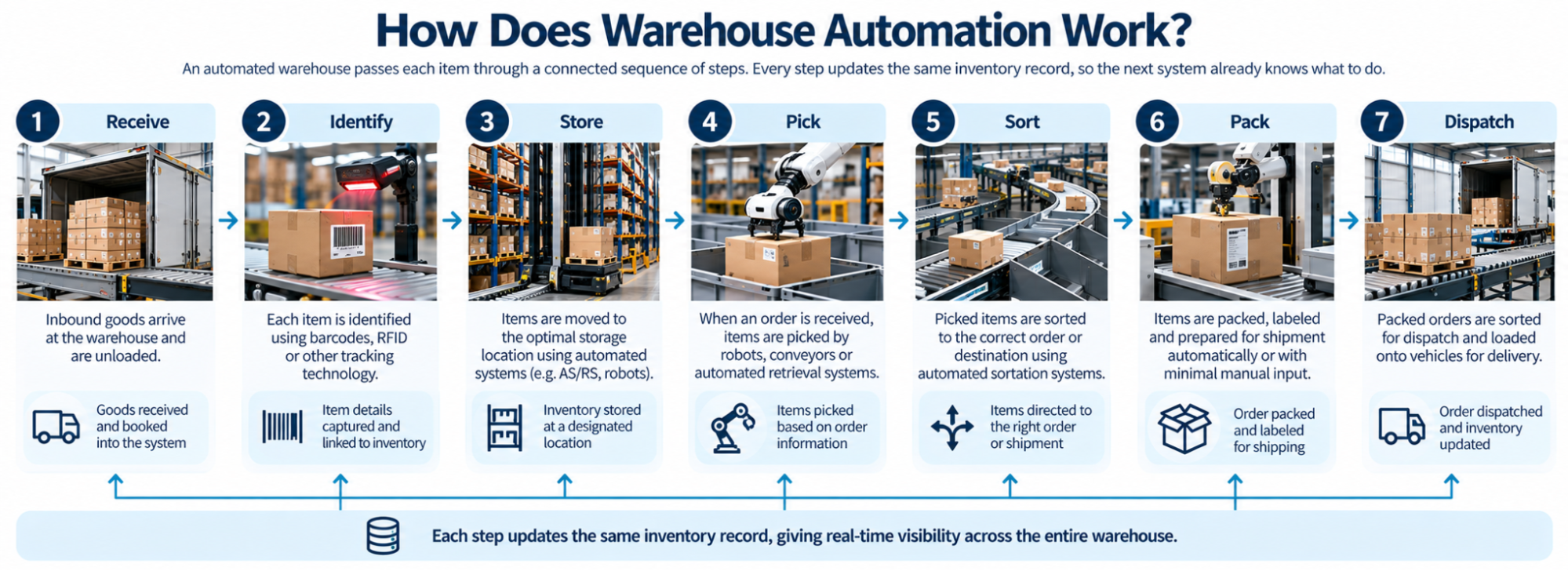
An automated warehouse passes each item through a connected sequence of steps. Every step updates the same inventory record, so the next system already knows what to do.
The flow runs as follows:
Receive → Identify → Store → Pick → Sort → Pack → Dispatch
Automated Receiving and Inventory Identification
As goods arrive, barcode scanners, RFID readers or computer vision capture each pallet, carton or item.
Connected systems match it against the expected delivery, update inventory records and flag discrepancies before putaway.
Automated Storage and Putaway
The WMS assigns a storage location using rules such as size, turnover and available space.
The WCS then directs conveyors, mobile robots or an AS/RS to move the goods there, and a scan confirms the location.
Automated Picking and Replenishment
When orders are released, an AS/RS or mobile robots bring items to a pick station, or guide workers to the right location.
The same systems support replenishment, moving reserve stock forward when pick locations run low.
Automated Sorting and Packing
Picked items travel to sortation, where they are grouped by order, carrier or destination.
At packing, the system can verify contents by scan or weight, suggest a carton size and print the shipping label.
Dispatch and Order Fulfillment
Completed orders are routed to staging lanes or dock doors by carrier and departure time, then confirmed as they are loaded.
This coordination is the point. Modern warehouse automation connects tasks into one workflow rather than automating a single activity in isolation.
What are the Benefits and Challenges of Warehouse Automation?
Warehouse automation can improve speed, accuracy and working conditions, but it also brings cost, complexity and new demands on staff.
Both sides should be weighed against the needs of the specific operation.
Improving Warehouse Productivity
Automation can increase throughput by handling goods continuously at a consistent pace. It reduces repetitive manual work such as walking between locations.
Order processing speeds up, and the operation can support higher volumes without adding labor at the same rate.
Improving Accuracy and Inventory Visibility
Automated identification and digital records remove many points where human error enters.
Scan-verified picks reduce picking errors, automatic updates reduce data-entry errors, and real-time records surface inventory discrepancies sooner.
Reducing Physical Strain and Improving Safety
Automation can take over lifting, carrying and long-distance walking. This reduces workers’ exposure to repetitive or physically demanding tasks.
It does not remove all risk. Automated equipment creates its own hazards, which need safeguards and training in line with applicable OSHA warehousing safety guidance.
High Initial Investment and Integration Complexity
The main barriers are cost and the effort of making new systems work with existing ones. The table shows where that investment typically goes.
| Area | What it involves |
|---|---|
| Equipment costs | Robots, conveyors, racking and installation |
| Software costs | Licenses, configuration and ongoing support |
| Integration | Connecting to the existing WMS, ERP and equipment |
| Implementation time | Design, installation, testing and phased go-live |
| Training | Teaching staff to operate and maintain the systems |
Why Automation Does Not Eliminate the Need for People
Automated systems handle predictable, repeatable work well. People remain important for exception handling, oversight, maintenance, decision-making and complex or unpredictable situations.
The goal is not necessarily a lights-out warehouse. In many operations, the practical aim is to combine automation with human expertise.
What Does an AI-Powered Automated Warehouse Look Like?
The clearest way to see how these pieces fit together is to follow one order through an AI-powered warehouse. The example below follows this sequence:
Order received → AI plans → Automation executes → AI monitors → Human handles exceptions → Order dispatched
An Order Enters the Warehouse
A customer orders three items for next-day delivery. The WMS receives the order.
AI then evaluates the relevant information: stock levels, where each item is stored and the carrier cut-off time.
AI Determines the Best Fulfillment Strategy
Before any equipment moves, the system weighs several factors to decide how the order should be fulfilled. Each one affects which resources are used.
| Factor | What the system checks |
|---|---|
| Inventory availability | Which locations hold all three items |
| Product location | Which option involves the least travel |
| Order priority | How close the order is to its cut-off |
| Worker and robot availability | Who or what is free for each task |
Robots and Automated Systems Execute the Tasks
The plan is released as tasks. An AS/RS retrieves a tote holding the first item, while an AMR collects the other two from shelving.
Conveyors bring everything to one pack station for verification and packing.
AI Monitors and Optimizes the Workflow
While the order moves, AI watches conditions across the warehouse.
If order volumes spike, an aisle becomes congested, equipment slows or inventory changes, it can reassign tasks, reroute robots or resequence orders.
Humans Handle Exceptions
Suppose a scan shows damaged packaging on one item. The system routes the order to a worker, who inspects it, decides on a replacement and releases the order.
The parcel is then sorted to the correct dock door and dispatched.
Where Is Warehouse Automation Used?
Warehouse automation is used wherever goods are stored and moved at volume, but priorities differ by setting.
Four environments show the most common applications.
E-Commerce Fulfillment
E-commerce warehouses handle large volumes of small, varied orders. Automation supports fast picking through goods-to-worker systems and mobile robots.
High-speed sorting by order and carrier then makes same-day or next-day fulfillment workable at scale.
Retail and Distribution Centers
Distribution centers move inventory between suppliers, other distribution centers, stores and customers.
Automation sorts mixed inbound loads, builds store-specific shipments and keeps stock data accurate, so store and online orders draw on the same inventory.
Manufacturing Warehouses
Here the warehouse feeds production and receives its output. Automation supports raw material storage and component movement by AGVs or AMRs.
It also handles production replenishment timed to the line, and finished goods handling into storage or dispatch.
Cold Storage and Specialized Warehouses
Some environments make manual work difficult. In cold storage, automation limits the time people spend at low temperatures.
The same applies to hazardous, heavy or high-value goods, where automation can improve safety and control.
Conclusion
The most effective warehouse automation strategy is not necessarily the one with the most robots or the highest level of technology. It is the one that addresses the operation’s biggest constraints while remaining manageable for the people, systems and facilities that must support it.
Before investing, teams should establish a reliable baseline, define the outcome they need to improve and test whether the proposed technology can integrate with existing workflows. A phased approach gives the business room to learn, measure results and expand only when the operational case is clear.
Want to Transform Operations with AI?
Learn how AI can streamline workflows, optimize processes, and improve operational efficiency with the Certificate Programme in AI-Powered Operations & Process Transformation by IIM Tiruchirappalli.
Frequently Asked Questions About Warehouse Automation
1. How much does warehouse automation cost?
There is no universal figure. Cost depends on warehouse size, operational complexity, the technologies selected, integration needs and throughput requirements.
2. How can a company determine if warehouse automation is worth the investment?
Compare current constraints, such as labor shortages, error rates and space limits, with the expected gains. The case is strongest when automation fixes the largest constraint within an acceptable payback period.
3. Which warehouse processes should be automated first?
Start with processes that are repetitive, high-volume and stable. For many warehouses, that means data capture and identification first, then goods movement and picking.
4. How do companies integrate warehouse automation with existing systems?
Integration usually runs through the WMS, using APIs or middleware to connect new equipment and its control software. Phased testing before go-live reduces disruption.
5. How can small warehouses implement automation with a limited budget?
Begin with barcode scanning and a cloud-based WMS. Mobile robots can then be added in small numbers, sometimes under subscription models that avoid a large upfront purchase.
6. What data is needed to implement AI in warehouse operations?
AI needs accurate, consistent data on orders, inventory levels and locations, product dimensions, task times and equipment performance. Data quality matters more than volume.
7. How can warehouses measure the ROI of automation?
Compare total cost of ownership with measured gains in throughput, cost per order, pick accuracy, labor hours and space utilization. Track them against a pre-automation baseline.
8. How can warehouse automation handle unexpected orders or operational disruptions?
Integrated systems can reprioritize tasks, reroute robots and shift work between zones as conditions change. Trained staff and manual fallback procedures cover situations the system cannot handle.
9. What skills do employees need to work with automated warehouse systems?
Operators need to use system interfaces, read dashboards and follow exception procedures. Technical roles also need equipment maintenance, troubleshooting and basic data analysis skills.
10. How long does it take to implement warehouse automation?
It depends on scope. Software changes or small robot deployments are quicker, while large fixed installations with complex integration take considerably longer.