IT Operations and Cloud Ops: Functions, Tools and AIOps

Key Insights
- IT Ops is the foundation, and Cloud Ops is a specialization within it. IT Operations keeps infrastructure, applications, networks, and services reliable and available. Cloud Ops applies the same discipline to cloud workloads, where resources are provisioned, scaled, and billed on demand.
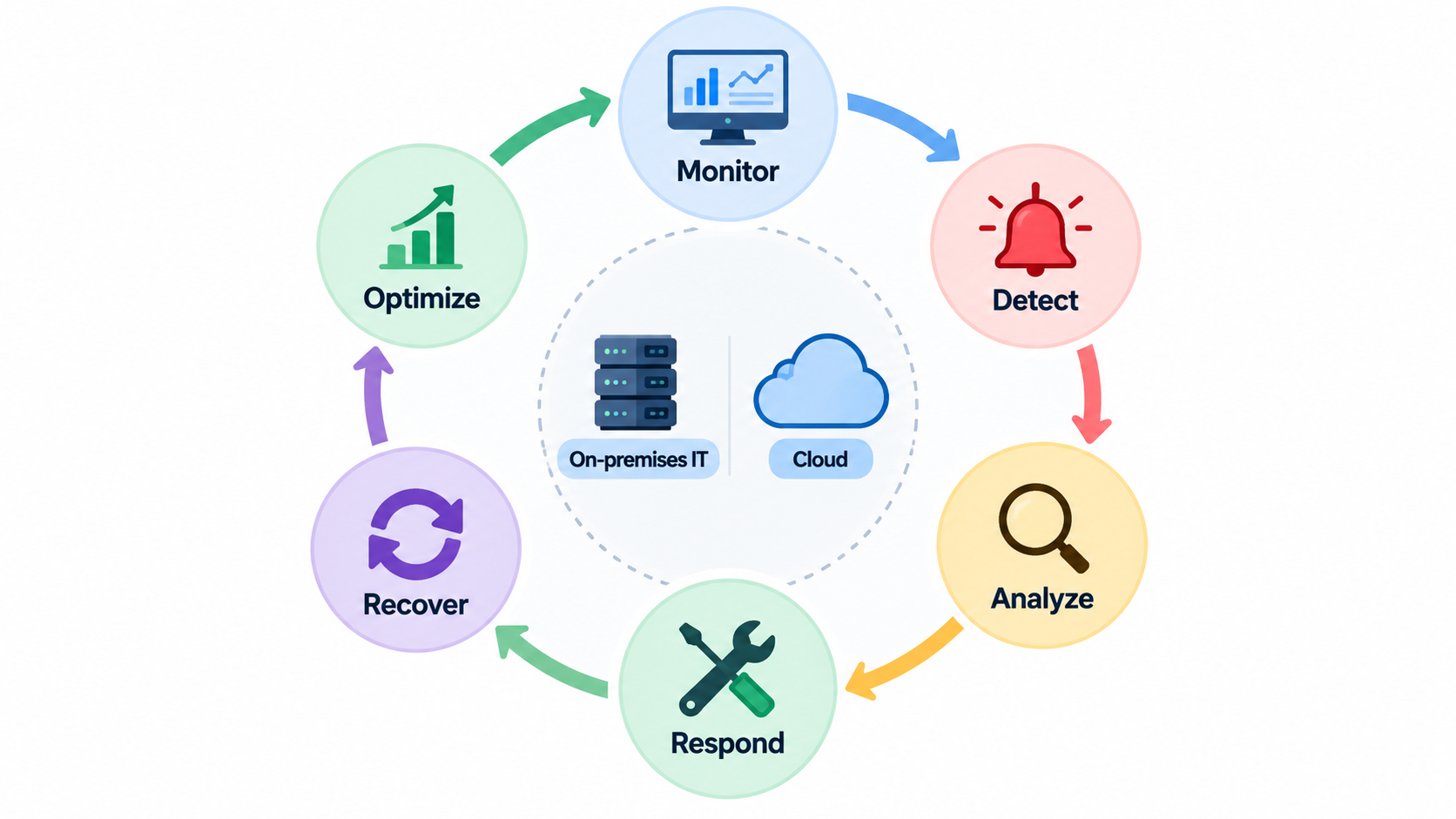
- Both follow one continuous operational cycle. Teams monitor, detect, analyze, respond, recover, and optimize, then feed what they learn back into better monitoring and automation.
- Hybrid is now the normal operating model. Gartner predicts that 90% of organizations will adopt a hybrid cloud approach through 2027, so IT Ops and Cloud Ops need shared monitoring, incident management, security, and service-level objectives.
- The cloud estate to operate keeps growing. Gartner forecasts worldwide IaaS spending of $287.3 billion in 2026, up 29.3% from 2025, while AI-optimized IaaS spending is expected to nearly double to about $42 billion.
- Downtime carries a real cost. In Uptime Institute’s 2025 annual survey, 57% of respondents said their most recent major outage cost more than $100,000, and 1 in 5 reported costs above $1 million.
- Process discipline still prevents outages. Uptime Institute finds that failure to follow established procedures remains the leading driver of human error-related outages, which makes runbooks and change management as important as tools.
- External dependencies add risk. Third-party providers, including cloud, telecom, and colocation companies, account for about two-thirds of the publicly reported outages Uptime Institute has tracked over nine years.
- Cost management now includes AI. The FinOps Foundation’s State of FinOps 2026 found that 98% of respondents manage AI spend, up from 63% in 2025 and 31% in 2024.
- Tools work best when grouped by the problem they solve. The five core categories are monitoring and observability, ITSM and incident management, configuration and automation, cloud management, and collaboration and alerting.
- AIOps is an intelligence layer, not a replacement for people. It correlates events, detects anomalies, suggests likely root causes, and triggers predefined workflows, but its accuracy depends on data quality, integration, and well-tested automation.
- Build in order: observe, automate, then add AIOps. Track uptime, MTTD, MTTR, incident volume, change failure rate, and cloud cost efficiency to prove each step is working.
IT Operations (IT Ops) is the function responsible for keeping an organization’s IT infrastructure, applications, networks, systems, and services reliable and available. Cloud Operations (Cloud Ops) covers the practices used to manage, monitor, secure, optimize, and maintain workloads and infrastructure running in cloud environments.
Cloud Ops is not a separate world. It is a specialized part of modern IT operations, focused on cloud-based infrastructure and services. AIOps, short for artificial intelligence for IT operations, adds AI and machine learning to analyze operational data, detect anomalies, automate responses, and improve service reliability.
This guide covers their core functions, the tools operations teams use, how IT Ops and Cloud Ops differ, and how AIOps is changing day-to-day operations work.
How do IT Operations and Cloud Ops Work?
IT Operations and Cloud Ops follow a continuous cycle of monitoring systems, identifying issues, managing infrastructure, resolving incidents, and improving performance. The cycle never really ends, because every incident and every improvement feeds back into better monitoring. Cloud Ops applies this same operational cycle to cloud environments, where resources change far more often.
The flow below shows the six stages that operations teams repeat for every service they manage.
Monitor IT Infrastructure, Applications and Cloud Resources
Monitoring is the starting point of all operations work, because teams can only manage what they can see. It gives a live view of whether services are healthy, fast, and available to users. Good monitoring covers every layer of the environment:
- Components: servers, networks, databases, applications, containers, and cloud resources
- Metrics: performance, availability, capacity, and health
- Signals: logs, events, and telemetry that show what each system is doing
Detect and Analyze Operational Issues
Monitoring data is only useful when teams can spot problems in it and understand what they mean. Detection separates normal behavior from issues that need attention, while analysis works out their scope and impact. Most issues fall into five groups:
- Performance degradation, such as slow response times
- Infrastructure failures in servers, storage, or network devices
- Security and configuration issues, such as open ports or incorrect settings
- Resource utilization anomalies, such as sudden CPU or memory spikes
- Application errors, including failed requests and crashes
Respond to Incidents and Service Disruptions
When an issue affects users, the priority shifts from analysis to restoring service quickly. A structured response keeps teams focused on the most urgent problems and avoids confusion during outages. This matters because downtime is costly: in Uptime Institute’s 2025 annual survey, 57% of respondents said their most recent major outage cost more than $100,000.
Incident response usually moves through four stages:
- Identification and prioritization: confirm the incident and rank it by business impact
- Troubleshooting and root-cause analysis: find what failed and why
- Escalation: bring in specialists or service owners when first responders cannot resolve it
- Service restoration: return the service to normal and confirm users are no longer affected
Automate Recovery and Routine Operations
Many operational tasks happen repeatedly and follow the same steps every time. Automating them reduces manual effort, speeds up recovery, and lowers the chance of human error. Teams typically automate these areas first:
- Automated remediation, such as restarting a failed service
- Infrastructure provisioning from approved templates
- Scaling resources up or down as demand changes
- Backup and recovery jobs that run on a schedule
- Routine maintenance, such as patching and log cleanup
Optimize IT and Cloud Environments
Optimization closes the loop by using what teams have learned to make systems run better. It focuses on efficiency as well as stability, so the environment can handle future demand without waste. Typical optimization targets include:
- Resource utilization across servers and cloud services
- Cloud costs, matched to actual usage
- System performance and response times
- Capacity planning for expected growth
- Reliability and availability targets
Key point: IT Ops keeps technology services reliable, while Cloud Ops applies these practices to dynamic cloud environments where infrastructure can be provisioned, scaled, and changed rapidly.
What are the Core Functions of IT Operations?
IT Operations covers the day-to-day activities required to keep an organization’s technology environment available, secure, performant, and reliable. These IT operations functions span physical and virtual infrastructure, business applications, networks, and the processes that protect them. Six functions form the core of most IT Ops teams.
Infrastructure and System Management
Infrastructure management keeps the hardware and software that everything else runs on healthy and correctly configured. Without a stable base, applications and services cannot stay available. This function covers:
- Servers and operating systems, including updates and health checks
- Storage and computing resources, sized for current workloads
- Network infrastructure, such as switches, routers, and firewalls
- Configuration management to keep systems consistent and documented
Application and Service Management
Users experience IT through applications, so keeping those applications running well is a central IT Ops responsibility. This function looks beyond individual servers to the full service a user depends on. It includes:
- Application availability during business hours and peak periods
- Performance monitoring for speed and responsiveness
- Service dependencies, such as databases and third-party APIs
- Application support for users and internal teams
Network Operations and Monitoring
Every application and cloud service depends on the network to move data between users, systems, and locations. Network operations makes sure connectivity stays fast, stable, and available. Core activities include:
- Network availability across offices, data centers, and cloud links
- Traffic monitoring to spot congestion or unusual flows
- Connectivity between sites, users, and cloud providers
- Network performance, including latency and packet loss
Incident and Problem Management
Incident management restores service quickly when something breaks, while problem management finds and removes the underlying cause. Together they stop the same failure from returning again and again. The function covers:
- Incident detection through alerts and user reports
- Troubleshooting to isolate the failing component
- Root-cause analysis to explain why the failure happened
- Recurring problem prevention through permanent fixes
Backup, Disaster Recovery and Business Continuity
Hardware fails, mistakes happen, and disasters occur, so IT Ops must be ready to recover data and services. This function plans for the worst and tests that recovery actually works. It includes:
- Data backup on a defined schedule
- Recovery procedures that are documented and tested
- Disaster recovery planning for major site or region failures
- Business continuity, so critical services keep running during disruption
IT Security and Compliance Operations
Security is part of daily operations, not a separate project. IT Ops teams apply and maintain the controls that protect systems and keep the organization compliant with its obligations. Key activities include:
- Access management for users, administrators, and service accounts
- Security monitoring for suspicious activity
- Patch management to close known vulnerabilities
- Compliance requirements, such as audit trails and data protection rules
What are the Core Functions of Cloud Operations?
Cloud Ops focuses on operating cloud infrastructure and services efficiently while maintaining availability, performance, security, and cost control. Because cloud resources are created, resized, and removed on demand, these functions rely heavily on automation and continuous visibility. The scale keeps rising: Gartner forecasts worldwide IaaS spending of $287.3 billion in 2026, up 29.3% from 2025.
Cloud Infrastructure Management
Cloud infrastructure management covers the building blocks that cloud workloads run on. Unlike physical hardware, these resources can be created or changed in minutes, so they must be tracked and governed closely. The main components are:
- Virtual machines for general compute workloads
- Containers for packaged, portable applications
- Storage for files, objects, and backups
- Databases, often run as managed cloud services
- Cloud networking, such as virtual networks, subnets, and load balancers
Cloud Monitoring and Observability
Cloud environments are distributed and change constantly, so basic uptime checks are not enough. Observability combines several signal types so teams can understand why a system behaves the way it does, not just whether it is running. Cloud Ops teams track:
- Infrastructure metrics, such as CPU, memory, and storage use
- Application performance, including latency and error rates
- Logs from services and cloud platforms
- Distributed tracing to follow a single request across multiple services
- Cloud service health reported by the provider
Cloud Security and Access Management
In the cloud, a single misconfigured setting can expose data or systems to the internet. Security is shared between the cloud provider and the customer, and Cloud Ops must manage the customer’s side carefully. This function includes:
- Identity and access management (IAM) with least-privilege permissions
- Security policies applied consistently across accounts and regions
- Configuration monitoring to catch risky changes
- Threat detection for suspicious activity
Cloud Cost and Resource Optimization
Cloud costs are usage-based, so every running resource adds to the monthly bill. Cost optimization makes sure the organization pays only for what it actually needs. The scope is also widening: the FinOps Foundation’s State of FinOps 2026 found that 98% of respondents now manage AI spend, up from 31% in 2024.
Core cost optimization practices include:
- Resource utilization reviews to match capacity to demand
- Overprovisioning checks for resources larger than needed
- Idle resources, such as unused instances or unattached storage
- Cost monitoring with budgets and alerts
- FinOps practices that make engineering, finance, and business teams share accountability for cloud spend
Scaling and Capacity Management
Elasticity is one of the cloud’s biggest advantages, but it has to be configured and managed well. Cloud Ops decides how and when workloads grow or shrink, so performance stays steady without wasting money. This function covers:
- Horizontal scaling (adding more instances) and vertical scaling (adding more power to one instance)
- Auto-scaling rules that react to demand automatically
- Capacity planning for predictable peaks and growth
- Workload management to balance load across resources
Cloud Automation and Infrastructure as Code
Manual changes do not scale in environments with hundreds or thousands of resources. Infrastructure as Code (IaC) defines infrastructure in version-controlled files, so environments can be created and changed consistently. Automation in Cloud Ops covers:
- Automated provisioning of new resources and environments
- Configuration management to prevent drift between environments
- Infrastructure as Code for repeatable, reviewable changes
- Deployment automation for releasing updates safely
Key point: Cloud Ops extends traditional IT operations with automation, elasticity, observability, and cost management designed for cloud environments.
What Is the Difference Between IT Operations and Cloud Ops?
IT Operations is the broader discipline covering an organization’s whole technology environment, while Cloud Ops focuses specifically on operating cloud-based infrastructure and workloads. Both share the same goals of reliability and availability. The difference lies mainly in scope, speed of change, and how costs are managed.
IT Operations vs Cloud Operations
The comparison below shows how the two approaches differ across eight areas. It also explains why Cloud Ops depends more heavily on automation and usage-based cost control. Most organizations need both working side by side.
| Area | IT Operations | Cloud Operations |
|---|---|---|
| Scope | Overall IT environment | Cloud environment |
| Infrastructure | Physical and virtual infrastructure | Primarily cloud infrastructure |
| Scaling | Often planned manually | Highly automated and elastic |
| Provisioning | Hardware/software provisioning | On-demand cloud provisioning |
| Cost management | IT infrastructure budgets | Usage-based cloud costs |
| Automation | Increasingly automated | Highly automation-driven |
| Monitoring | Systems, networks, applications | Cloud resources, workloads and services |
| Key focus | Stability and availability | Stability, scalability, agility and cost |
How IT Ops and Cloud Ops Work Together
Few organizations run entirely in the cloud or entirely on-premises. Gartner predicts that 90% of organizations will adopt a hybrid cloud approach through 2027, so IT Ops and Cloud Ops must operate as one coordinated function. In practice, they work together through:
- Traditional infrastructure + cloud environments: both are managed as one service estate
- Hybrid IT operations: shared processes for workloads that span data centers and the cloud
- Shared monitoring and incident management: one view of system health and one incident process
- Unified security and compliance: the same policies and controls in every environment
- Common service-level objectives: shared reliability targets, wherever a workload runs
Key point: Cloud Ops is not a replacement for IT Ops; it is a specialized operational approach for cloud environments.
What Tools Are Used in IT Operations and Cloud Ops?
Operations teams use different categories of tools to monitor infrastructure, manage incidents, automate workflows, secure systems, and optimize cloud resources. Most organizations combine several categories rather than relying on a single platform. Grouping IT operations tools by the problem they solve makes it easier to spot gaps and avoid overlap.
The map below links each tool category to the operational problem it addresses and the functions it provides.
| Tool category | Operational problem it solves | Core functions |
|---|---|---|
| Infrastructure monitoring and observability | Is the system healthy, and why is it behaving this way? | Metrics, application monitoring, logs, tracing, alerting |
| IT service management and incident management | How do we track, fix, and learn from issues and requests? | Incidents, service requests, changes, service levels, knowledge |
| Configuration and automation | How do we make changes consistently and at scale? | Configuration, provisioning, Infrastructure as Code, workflows |
| Cloud management and monitoring | Are cloud resources secure, efficient, and cost-effective? | Resource monitoring, cost, security, performance |
| Collaboration and alerting | Who needs to know, and who acts right now? | Notifications, communication, escalation, on-call |
Infrastructure Monitoring and Observability Tools
These tools collect and display the signals that show how systems are performing. They act as the eyes of the operations team and feed data to most other tool categories. Typical capabilities include:
- Infrastructure metrics for servers, networks, and cloud resources
- Application monitoring for response times and errors
- Log management to collect, search, and retain logs
- Distributed tracing across services
- Alerting when metrics cross defined thresholds
IT Service Management and Incident Management Tools
IT service management (ITSM) tools give structure to how IT work is requested, tracked, and completed. They keep a record of every incident and change, which helps teams learn and improve over time. Core functions include:
- Incident tracking from first report to resolution
- Service requests, such as access or new equipment
- Change management to review and approve changes before release
- Service-level management to track agreed targets
- Knowledge management for shared fixes and documentation
Configuration and Automation Tools
Configuration and automation tools remove repetitive manual work and keep systems consistent. They are essential in cloud environments, where resources change often and at scale. These tools handle:
- Configuration management to enforce standard settings
- Infrastructure provisioning from templates
- Infrastructure as Code for versioned, reviewable infrastructure
- Workflow automation for multi-step operational tasks
Cloud Management and Monitoring Tools
Cloud management tools cover the parts of operations that are specific to cloud platforms. They are often built into cloud providers or used across several clouds at once. Their main functions are:
- Cloud resource monitoring across accounts and regions
- Cost management with budgets, usage reports, and forecasts
- Security monitoring for misconfigurations and threats
- Performance optimization recommendations
Collaboration and Alerting Tools
Detecting a problem only helps if the right people hear about it quickly. Collaboration and alerting tools route notifications and coordinate the response, especially outside working hours. They support:
- Incident notifications through chat, SMS, phone, or email
- Team communication during active incidents
- Escalation workflows when an alert is not acknowledged
- On-call management with schedules and rotations
Key point: Tools should be grouped by the operational problem they solve rather than presented as an unrelated list of software names.
What is AIOps and How Does It Improve IT Operations?
AIOps applies artificial intelligence and machine learning to operational data from applications, infrastructure, logs, events, and monitoring systems. It helps teams detect issues earlier and automate repetitive operational work. Its value depends on the quality of the data it receives and on how carefully its automated actions are designed.
How AIOps Works
AIOps turns large volumes of raw operational data into prioritized insights and, where it is safe, automated actions. Each stage in the flow below narrows thousands of signals down to the few that matter. The output supports human decisions rather than replacing them.
Operational Data → Data Correlation → AI/ML Analysis → Anomaly Detection → Root-Cause Insights → Automated Action
Data is collected, related events are linked, models look for patterns, unusual behavior is flagged, likely causes are suggested, and predefined workflows run when set conditions are met.
AIOps for Anomaly Detection
Static thresholds miss problems that build slowly and raise false alarms during normal peaks. AIOps learns what normal behavior looks like for each system and flags meaningful deviations. This helps teams:
- Identify unusual system behavior that fixed rules would miss
- Detect performance deviations before users notice them
- Reduce alert noise from expected fluctuations
- Identify potential incidents earlier
AIOps for Event Correlation
A single failure can trigger dozens of alerts across different tools and teams. Event correlation links these signals, so responders see one incident instead of many. It works by:
- Connecting events from multiple systems
- Grouping related alerts into a single incident
- Identifying patterns across time and services
- Reducing duplicate incidents and tickets
AIOps for Root-Cause Analysis
Finding the cause of an incident is often the slowest part of resolving it. AIOps narrows the search by analyzing how systems depend on each other and which signals changed first. It can:
- Analyze dependencies between applications and infrastructure
- Correlate logs, metrics, and events
- Identify likely sources of failure
- Support faster troubleshooting for engineers
These are likely causes, not guaranteed answers, so engineers still confirm them before acting.
AIOps for Automated Remediation
Some incidents are well understood and are always fixed the same way. AIOps can trigger approved fixes automatically for these cases, freeing engineers for more complex work. Common actions include:
- Triggering predefined workflows or runbooks
- Restarting failed services
- Scaling resources when demand spikes
- Resolving repetitive, low-risk incidents
AIOps for Predictive Operations
Predictive operations use historical trends to anticipate problems before they cause outages. This shifts operations from reacting to incidents toward preventing them. AIOps supports this by helping teams:
- Predict potential failures, such as disks nearing capacity
- Forecast capacity requirements for upcoming demand
- Identify gradual performance degradation
- Support proactive maintenance
Key point: AIOps does not replace IT operations teams; it helps them process large volumes of operational data and automate repetitive decisions.
How do IT Operations, Cloud Ops and AIOps Work Together?
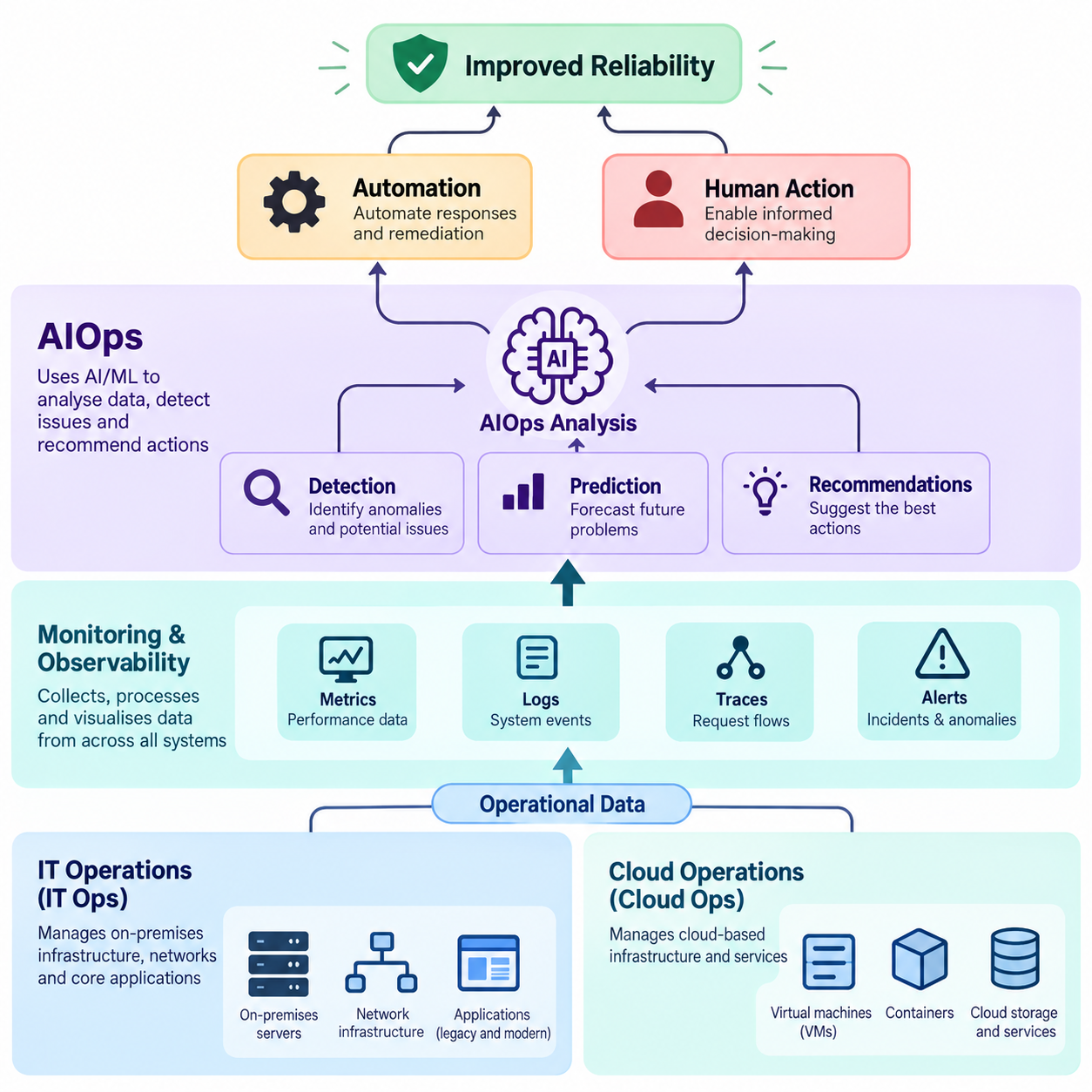
Modern operations combine human expertise, cloud infrastructure, automation, observability, and AI-driven analysis. AIOps adds an intelligence layer on top of existing IT and Cloud Ops processes rather than running on its own. The flow below shows how data and decisions move through this combined model.
IT Ops Provides the Operational Foundation
IT Ops owns the core environment and the processes that every other layer depends on. Without stable infrastructure and clear processes, neither Cloud Ops nor AIOps can work well. This foundation includes:
- Infrastructure, both on-premises and virtual
- Applications that support the business
- Networks that connect users and systems
- Services delivered to users and customers
- Processes for incidents, changes, and problems
Cloud Ops Manages Dynamic Cloud Environments
Cloud Ops handles the parts of the estate that change quickly and are billed by usage. It brings cloud-specific skills and automation to workloads that traditional processes alone may not handle well. Its responsibilities include:
- Cloud resources across providers and regions
- Scalability through auto-scaling and capacity planning
- Cloud security, including access and configuration controls
- Cost optimization based on actual usage
AIOps Adds Intelligence and Automation
AIOps sits across both IT Ops and Cloud Ops, analyzing the data they produce. It helps teams see patterns and act faster than manual analysis allows, while people stay in control of important decisions. Its contributions include:
- Data correlation across tools and environments
- Anomaly detection based on learned behavior
- Predictive insights for capacity and failures
- Automated remediation for known, low-risk issues
What are the Benefits of AIOps for IT and Cloud Operations?
AIOps can help operations teams manage increasingly complex environments by reducing manual work and improving the speed and accuracy of incident response. The size of these benefits varies by organization and depends on data quality, integration, and how well automation is tuned. The most common benefits are outlined below.
Faster Incident Detection and Resolution
AIOps shortens the time between a problem starting and engineers knowing about it. It also gives responders context, so less time is spent searching for the cause. This leads to:
- Earlier detection of unusual behavior
- Faster investigation using correlated data and likely causes
- Reduced mean time to resolution (MTTR)
Reduced Alert Noise
Too many alerts cause alert fatigue, where important warnings get lost among routine ones. AIOps filters and organizes alerts, so teams can focus on what matters. It does this through:
- Event correlation that merges related alerts
- Alert prioritization based on business impact
- Duplicate alert suppression
Better System Reliability
Reliability improves when teams fix problems before users feel them. AIOps supports this by spotting early warning signs and acting on known issues automatically. Key mechanisms include:
- Proactive monitoring of trends, not just fixed thresholds
- Predictive maintenance before components fail
- Automated recovery for known failure patterns
Greater Operational Efficiency
Engineers spend much of their time on repetitive tasks that follow the same steps each time. Automating this work frees them for projects that improve the environment. Efficiency gains come from:
- Fewer repetitive tasks handled by hand
- Automated workflows for routine fixes
- Better use of engineering time on higher-value work
Improved Cloud Cost Management
Cloud bills can change quickly as usage grows or resources are left running. AI-driven analysis of usage patterns can flag waste and unexpected costs early. The FinOps Foundation’s State of FinOps 2026 lists anomaly detection and automated right-sizing recommendations among the early uses of AI in cloud cost work.
These capabilities help teams:
- Detect underutilized resources
- Identify abnormal spending
- Support resource optimization decisions
What are the Challenges of IT Operations, Cloud Ops and AIOps?
Modern operations can become difficult as organizations adopt more cloud services, distributed architectures, automation, and large volumes of operational data. Each new layer adds dependencies to monitor and more places where things can fail. These five challenges are the most common.
Increasing Infrastructure Complexity
Modern environments are made up of many small, connected parts spread across locations and providers. Failures increasingly come from interactions between systems rather than one broken component. Uptime Institute reports that third-party providers, including cloud, telecom, and colocation companies, account for about two-thirds of the publicly reported outages it has tracked over nine years.
Complexity mainly comes from:
- Hybrid and multi-cloud environments
- Microservices with many dependencies
- Containers that start and stop frequently
- Distributed systems spread across regions
Data Quality and Integration Problems
Monitoring and AIOps are only as good as the data they receive. Gaps or inconsistencies lead to blind spots, missed incidents, and misleading insights. Common problems include:
- Inconsistent monitoring data across teams and tools
- Disconnected tools that do not share information
- Missing telemetry from key systems
- Data silos between IT, cloud, and application teams
Automation and AIOps Risks
Automation can make problems worse if it acts on wrong information or poorly designed rules. Uptime Institute notes that operators are investing in automation to manage complexity, but that more automation can cause different classes of problems. The main risks are:
- Incorrect automated actions, such as restarting the wrong service
- False positives that trigger unnecessary responses
- Poorly configured workflows with no safety checks
- Overdependence on automation, which can weaken manual skills
Security and Compliance Requirements
Operations teams handle powerful access and sensitive data every day. Cloud environments add new risks, because a single setting can expose resources publicly. Key concerns include:
- Access control for people, tools, and automated workflows
- Sensitive operational data stored in logs and tickets
- Cloud misconfigurations that expose systems
- Regulatory requirements for data handling and audits
Skills and Adoption Challenges
New tools and practices only work when teams know how to use them. Many organizations find that skills, not technology, slow down modern operations. The main gaps are in:
- Cloud skills across different providers
- Automation expertise, including scripting and Infrastructure as Code
- AI/ML understanding to interpret and tune AIOps
- Cross-functional collaboration between IT, cloud, security, and development teams
How can Businesses Build a Modern IT Operations and Cloud Ops Strategy?
A modern operations strategy should combine strong monitoring and service management foundations with automation, cloud-native practices, and AIOps where they provide measurable value. The order matters, because each step depends on the one before it. The five steps below provide a practical path.
Establish Monitoring and Observability First
Every later step, including automation and AIOps, depends on reliable operational data. Teams should first make sure they can see the health of every important service in one place. This step involves:
- Centralizing operational data from IT and cloud environments
- Defining key metrics for each critical service
- Establishing service-level objectives (SLOs), the reliability targets each service should meet
Automate Repetitive Operational Tasks
Once teams can see their environment clearly, they can automate the tasks they repeat most often. Starting with simple, low-risk tasks builds confidence before tackling complex workflows. Good candidates include:
- Provisioning of standard resources
- Scaling based on demand
- Backups and backup verification
- Incident workflows, such as ticket creation and notifications
Standardize Incident and Change Management
Consistent processes reduce confusion during incidents and lower the risk that a change causes an outage. This matters because Uptime Institute reports that failure to follow established procedures remains the leading driver of human error-related outages. Teams should:
- Define escalation processes with clear owners
- Create runbooks for common incidents
- Document recurring issues and their fixes
- Track operational performance after each change
Introduce AIOps for High-Value Use Cases
AIOps works best when it targets a specific, measurable problem. Starting with one or two use cases makes it easier to prove value and tune the system before expanding. Strong starting points include:
- Alert correlation to cut noise
- Anomaly detection for critical services
- Root-cause analysis for frequent or complex incidents
- Predictive capacity planning
Measure Operational Performance
Measurement shows whether changes to tools and processes are actually helping. Tracking the same metrics over time also helps teams justify further investment. Key metrics include:
- Uptime: the share of time a service is available
- MTTR (mean time to resolution): the average time taken to restore service after an incident
- MTTD (mean time to detect): the average time taken to notice an incident
- Incident volume: the number of incidents over a period
- Change failure rate: the share of changes or deployments that cause a failure needing an immediate fix
- Cloud cost efficiency: cloud spend compared with the usage or business value it supports
Key point: AIOps should solve specific operational problems rather than being adopted simply because an organization wants to “use AI.”
IT Operations and Cloud Ops Example: Managing a Cloud Application
A practical example shows how IT Ops, Cloud Ops, and AIOps interact when a cloud-hosted application experiences a performance problem. In this scenario, an online booking application slows down during a busy evening. The five steps below follow the incident from the first signal to the long-term fix.
Step 1 : Monitor Application and Infrastructure Metrics
The operations team already tracks the application’s key health signals on a shared dashboard. These metrics establish what normal looks like, so problems stand out quickly. The team watches:
- CPU and memory usage
- Application latency
- Error rates
- Network performance
Step 2 : AIOps Detects an Anomaly
During peak traffic, response times climb well above their usual pattern for that time of day. AIOps flags the change before most users complain and links it to related events. It provides:
- Detection of an unusual increase in latency
- Correlation with infrastructure events, such as rising database CPU usage
- Alert prioritization that marks the incident as high impact
Step 3 : Operations Team Investigates the Root Cause
Engineers use the AIOps insights as a starting point, then confirm the cause themselves. They work through the evidence step by step. The team will:
- Review logs for errors and timeouts
- Check dependencies, such as the database and payment service
- Analyze recent changes, such as a release deployed earlier that day
In this case, the team finds that a new database query in the latest release cannot handle peak demand.
Step 4 : Cloud Ops Scales or Remediates the Environment
With the cause confirmed, Cloud Ops acts to restore performance quickly. Some actions run automatically through predefined workflows, while others need an engineer’s approval. Typical actions are:
- Increase resources for the database tier
- Scale workloads by adding application instances
- Restart affected services that have stopped responding
Step 5 : Monitor Recovery and Prevent Recurrence
The incident is not finished when latency drops. The team confirms that the fix holds and uses what it learned to prevent a repeat. Follow-up work includes:
- Verify service performance against normal baselines and SLOs
- Document the incident and its root cause
- Update automation and runbooks with the new fix
- Improve capacity planning for future peaks
Transform IT Operations with AI
Discover how AI can streamline workflows, improve operational decision-making, and drive process efficiency with the Certificate Programme in AI-Powered Operations & Process Transformation by IIM Tiruchirappalli.
Explore the programme and take the next step towards smarter, AI-driven operations.
Frequently Asked Questions About IT Operations, Cloud Ops and AIOps
How can companies choose the right IT operations tools for their needs?
Start with the operational problems you need to solve, such as slow detection, alert noise, or manual provisioning, and map them to the tool categories above. Check that each tool integrates with your existing systems, supports your mix of on-premises and cloud infrastructure, and can scale with you. A short pilot using real data is the most reliable way to compare options.
What skills are needed to start a career in IT operations or Cloud Ops?
Core skills include operating systems (especially Linux), networking basics, scripting, and monitoring. For Cloud Ops, add hands-on experience with at least one major cloud platform, Infrastructure as Code, containers, and identity and access management. Troubleshooting ability, clear communication during incidents, and familiarity with ITSM processes matter just as much as technical knowledge.
Is Cloud Ops a good career path for cloud engineers?
For many cloud engineers, yes. Cloud infrastructure keeps expanding, with Gartner forecasting 29.3% growth in worldwide IaaS spending in 2026, and every workload needs people who can run it reliably and cost-effectively. Cloud Ops also builds automation, observability, security, and FinOps skills that transfer to DevOps, platform engineering, and SRE roles.
How can businesses manage IT operations across hybrid and multi-cloud environments?
Use centralized monitoring that brings data from data centers and every cloud provider into one view. Apply the same incident, change, and security processes everywhere, and define service-level objectives that do not depend on where a workload runs. Infrastructure as Code and consistent resource tagging help keep environments manageable as they grow.
How can companies reduce IT operations costs without affecting reliability?
Start by removing waste, such as idle resources, overprovisioned instances, and overlapping tools. Automate repetitive tasks so engineers spend less time on manual work. Use SLOs to decide where high redundancy is truly needed, and check reliability metrics before making any cost cut permanent.
What is the difference between AIOps, DevOps and SRE?
DevOps is a set of cultural and technical practices that brings development and operations teams together to deliver software faster and more reliably. Site Reliability Engineering (SRE), which originated at Google, applies software engineering to operations and manages reliability through service-level objectives and error budgets. AIOps is a technology approach that uses AI and machine learning to analyze operational data, and it can support both DevOps and SRE teams.
How can businesses measure the ROI of AIOps?
Record baseline metrics before adoption, such as MTTD, MTTR, alert volume, incident count, and engineering hours spent on repetitive work. Compare the same metrics after rollout, and convert time saved and downtime avoided into cost using your own outage cost estimates. Subtract licensing, integration, and training costs, and rely on your own data rather than general claims, because results vary by environment.
How can companies avoid false alerts and incorrect automated actions in AIOps?
Start with complete, high-quality data and tune models to each service’s normal behavior. Run AIOps in recommendation-only mode first, so engineers can review its suggestions before automation is switched on. Limit automated actions to well-understood, low-risk fixes, add approval steps and rollback options, and review automated actions regularly.
How should businesses prepare their IT infrastructure before adopting AIOps?
Make sure monitoring and observability cover all critical services, and that logs, metrics, and events are collected consistently. Keep an accurate inventory of systems and their dependencies, and standardize incident and change processes. Define clear use cases and success metrics before choosing a platform.
What data does AIOps need to make accurate operational decisions?
AIOps needs metrics, logs, events, and traces from infrastructure, applications, and cloud services. It also benefits from context, such as service dependencies, configuration and change records, incident history, and topology data. The data must be timely, consistent, and complete, because gaps or poor-quality inputs lead to inaccurate recommendations.
How can IT operations teams manage legacy systems alongside cloud infrastructure?
Bring legacy systems into the same monitoring and incident management processes as cloud workloads, using agents or integrations where possible. Document dependencies between legacy and cloud services, so failures can be traced across both. Automate what legacy platforms allow, and plan modernization for systems that can no longer be supported reliably.
What factors should businesses consider when scaling Cloud Ops across multiple cloud platforms?
Consider consistent governance, identity and access management, and security policies across providers. Plan for unified monitoring, cost visibility, and tagging, since each platform reports data differently. Teams also need skills for every platform in use, and Infrastructure as Code helps keep deployments repeatable. Weigh the operational overhead of each new platform against the value it adds.
Sources
Gartner Forecasts Worldwide Public Cloud End-User Spending to Total $723 Billion in 2025
Gartner Forecasts Worldwide AI-Optimized IaaS Spending to Grow 96% Through 2026