LLM Quantization Explained: GPTQ vs AWQ vs GGUF

Key Insights
- Quantization reduces the number of bits used to represent model weights, lowering memory requirements and potentially improving inference efficiency.
- FP16, INT8 and INT4 offer different precision and memory trade-offs. Lower-bit representations save more weight memory but may introduce greater quantization error.
- Post-training quantization (PTQ) converts an already-trained model, while quantization-aware training (QAT) incorporates quantization effects during training or fine-tuning.
- GPTQ uses calibration and weight-error optimisation, while AWQ uses activation information to help protect weights important to model behaviour.
- GGUF is a model file format that supports multiple tensor types, including quantized variants such as Q4_K_M, Q5_K_M and Q8_0. It is not a quantization algorithm equivalent to GPTQ or AWQ.
- Quantized LLM inference speed and accuracy depend on the model, quantization configuration, hardware, inference kernels and workload. INT4 is not always faster than INT8.
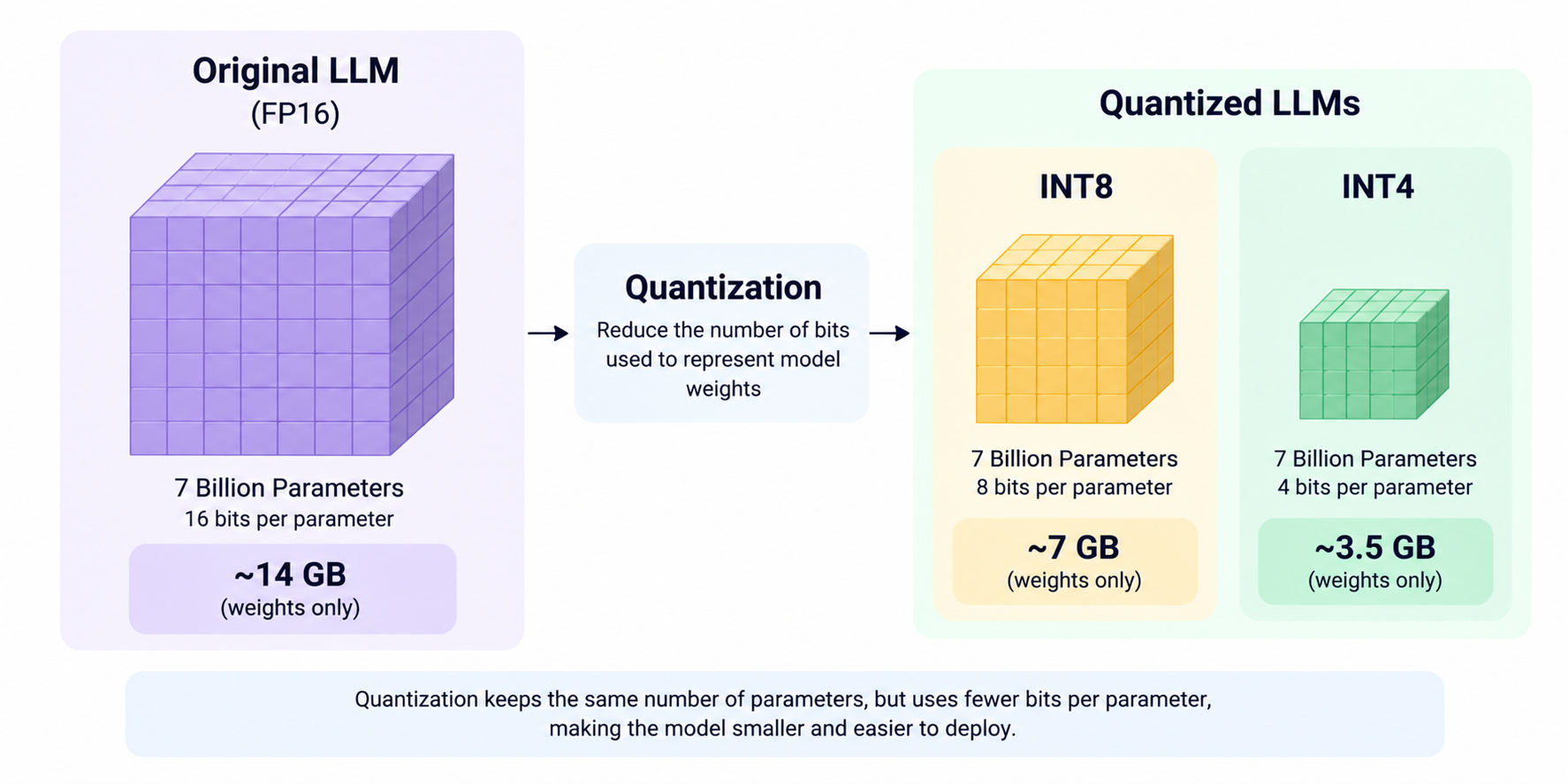
- A 7-billion-parameter model has an illustrative raw weight-memory estimate of approximately 14 GB at FP16, 7 GB at INT8 and 3.5 GB at INT4. Actual runtime memory requirements are higher because of metadata, buffers, activations and the KV cache.
Quantization in LLMs reduces the precision used to represent model weights, making large language models smaller and often easier to deploy on limited hardware. When a model requires more GPU memory than a system can provide, model quantization can help it fit within the available resources. However, the right approach depends on the required output quality, hardware and inference software.
GPTQ and AWQ are post-training quantization methods, whereas GGUF is a model file format that supports different tensor types, including quantized weights. This guide explains how quantization works, compares FP16, INT8 and INT4, and examines GPTQ vs AWQ vs GGUF to help you choose a suitable approach for local LLM deployment.
What is Quantization in an LLM?
Quantization in an LLM is the process of representing model weights, and sometimes other values used in computation, with lower-precision data types. It reduces the memory required to store a model and may improve inference efficiency, depending on the hardware and runtime.
Why do LLMs need quantization?
Large language models contain billions of parameters, each requiring memory during inference. A model stored in full precision may exceed the available GPU VRAM or system RAM, making local deployment difficult or expensive.
Quantization addresses this constraint by reducing the number of bits used to represent weights. This can make a model accessible on consumer hardware, although lower precision does not automatically guarantee faster inference or unchanged output quality.
How much memory can quantization save?
For a model with 7 billion parameters, the approximate memory required for weights alone can be estimated by multiplying the parameter count by the number of bits per parameter.
| Weight precision | Bits per parameter | Approximate weight memory |
|---|---|---|
| FP16 | 16 | 14 GB |
| INT8 | 8 | 7 GB |
| INT4 | 4 | 3.5 GB |
These are theoretical decimal estimates, calculated before metadata, quantization scales, runtime buffers, activations and the key-value (KV) cache. Actual memory requirements will be higher, and practical formats may use mixed precision or additional metadata.
The important distinction is that weight memory is only one part of the total memory needed to run an LLM.
FP16 vs INT8 vs INT4: What Is the Difference?
FP16 uses 16-bit floating-point values, while INT8 and INT4 use 8-bit and 4-bit integer representations, respectively. Lower-bit representations generally reduce weight storage, but can introduce more quantization error.
When should you use FP16, INT8 or INT4?
- FP16: A useful baseline when hardware supports half-precision computation and preserving model quality is a priority. It requires more weight memory than INT8 or INT4.
- INT8: A middle ground when you need meaningful memory savings while retaining more precision than many lower-bit configurations.
- INT4: Useful when memory is the main constraint, such as running a model locally on hardware with limited VRAM.
These are general guidelines, not universal rankings. Actual implementations may use scales, zero points, block-wise quantization and mixed-precision tensors. Therefore, a nominal 4-bit model does not necessarily use exactly four bits per parameter across every tensor.
What is the Difference Between PTQ and QAT?
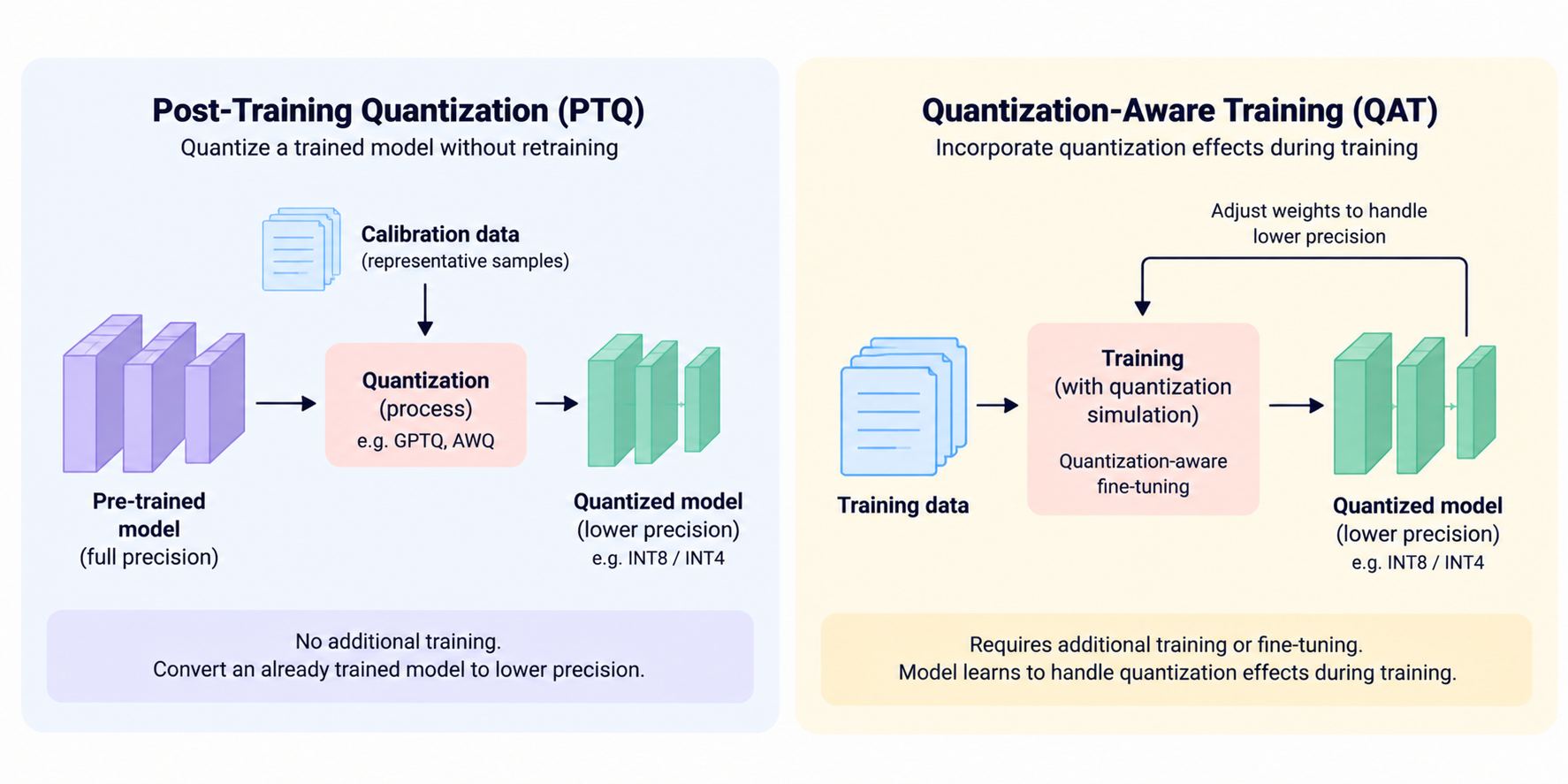
Post-training quantization (PTQ) converts a trained model to a lower-precision representation, while quantization-aware training (QAT) incorporates quantization effects into training or fine-tuning so the model can adapt to them.
Post-training quantization
PTQ is often convenient when a pretrained model is already available and additional training is undesirable. Depending on the method, representative calibration data can help determine how to quantize weights while limiting the effect on model outputs.
GPTQ and AWQ are examples of post-training approaches. Their objectives and quantization procedures differ, even though both are used to reduce weight precision.
Quantization-aware training
QAT simulates or incorporates quantization effects during training or fine-tuning. This allows model parameters to adapt to the reduced precision, potentially helping preserve quality for demanding applications.
However, QAT requires additional training effort and computational resources. It may be worth considering when PTQ does not meet quality requirements, but it is not automatically the better option for every deployment.
GPTQ vs AWQ vs GGUF: What Is the Difference?
GPTQ and AWQ are post-training quantization methods, while GGUF is a model file format that stores tensors and metadata and supports multiple quantized tensor types. They are related parts of the LLM deployment ecosystem, but they are not three equivalent quantization algorithms.
How does GPTQ work?
GPTQ is a post-training weight quantization method that uses calibration data and weight-error optimisation informed by approximate second-order information. It aims to reduce the precision of model weights while limiting the resulting error.
GPTQ is commonly used in low-bit, GPU-oriented deployment workflows supported by compatible inference engines. Its actual quality and performance depend on the model, calibration data, quantization configuration and runtime.
The original GPTQ research paper demonstrated quantization of very large language models. Its reported results are specific to the experiments in that paper and should not be treated as a performance guarantee for every model or device.
How does AWQ work?
AWQ stands for Activation-aware Weight Quantization. It uses activation information to identify weights that are particularly important to model behaviour and applies scaling strategies to help protect them during low-bit quantization.
Like GPTQ, AWQ is a post-training approach commonly used for low-bit weight quantization. Supported kernels and inference engines affect how efficiently a quantized model runs.
Neither AWQ nor GPTQ is universally more accurate or faster. Compare compatible implementations on the hardware and workload you intend to use.
What is GGUF, and why is it different?
GGUF is a file format used by the llama.cpp ecosystem. It packages model tensors, metadata and other information needed by compatible inference software. It supports multiple tensor types, including quantized variants.
Examples include Q4_K_M, Q5_K_M and Q8_0. These names identify particular GGUF tensor quantization configurations; they are not separate algorithms equivalent to GPTQ and AWQ. Some variants also mix tensor precisions, so the effective storage per parameter can differ from the nominal bit width.
GGUF is commonly used for local inference on CPUs and supported GPU or CPU/GPU hybrid configurations. The available hardware acceleration depends on the model architecture, backend and software version.
GPTQ vs AWQ vs GGUF comparison
| Factor | GPTQ | AWQ | GGUF |
|---|---|---|---|
| What it is | Post-training quantization method | Activation-aware post-training quantization method | Model file format |
| How it works | Uses calibration and weight-error optimisation | Uses activation information to protect important weights | Packages tensors and metadata |
| Common precision choices | Often 4-bit; other configurations depend on tooling | Often 4-bit; other configurations depend on tooling | Q4, Q5, Q8 and other supported tensor types |
| Typical tooling | GPTQ tools and compatible inference engines | AWQ tools and compatible inference engines | llama.cpp, Ollama and compatible tools |
| CPU suitability | Depends on backend and format support | Depends on backend and format support | Common choice for supported local CPU inference |
| GPU suitability | Commonly used with compatible GPU stacks | Commonly used with compatible GPU stacks | Supports compatible CPU and GPU backends |
| Best fit | A supported GPTQ deployment workflow | A supported AWQ deployment workflow | Local inference and flexible deployment through compatible tools |
The practical choice is not simply which name sounds most efficient. First decide which inference software and hardware you will use, then select a supported model representation and quantization configuration.
How does Quantization Affect Model Quality and Speed?
Quantization generally reduces weight memory, but lower precision can affect accuracy, reasoning, instruction following and generation quality. Its impact on speed depends on the quantization scheme, hardware, inference kernels, batch size and workload.
Does INT4 always run faster than INT8?
No. INT4 uses less nominal weight storage than INT8, but a runtime must support efficient low-bit operations to turn those savings into faster inference. On some systems, the speed advantage may be limited or absent.
Memory savings can still be useful even without a speed improvement. A smaller representation may allow a larger model to fit on the available hardware, which can be more valuable than accelerating individual operations.
How should you choose a quantization level?
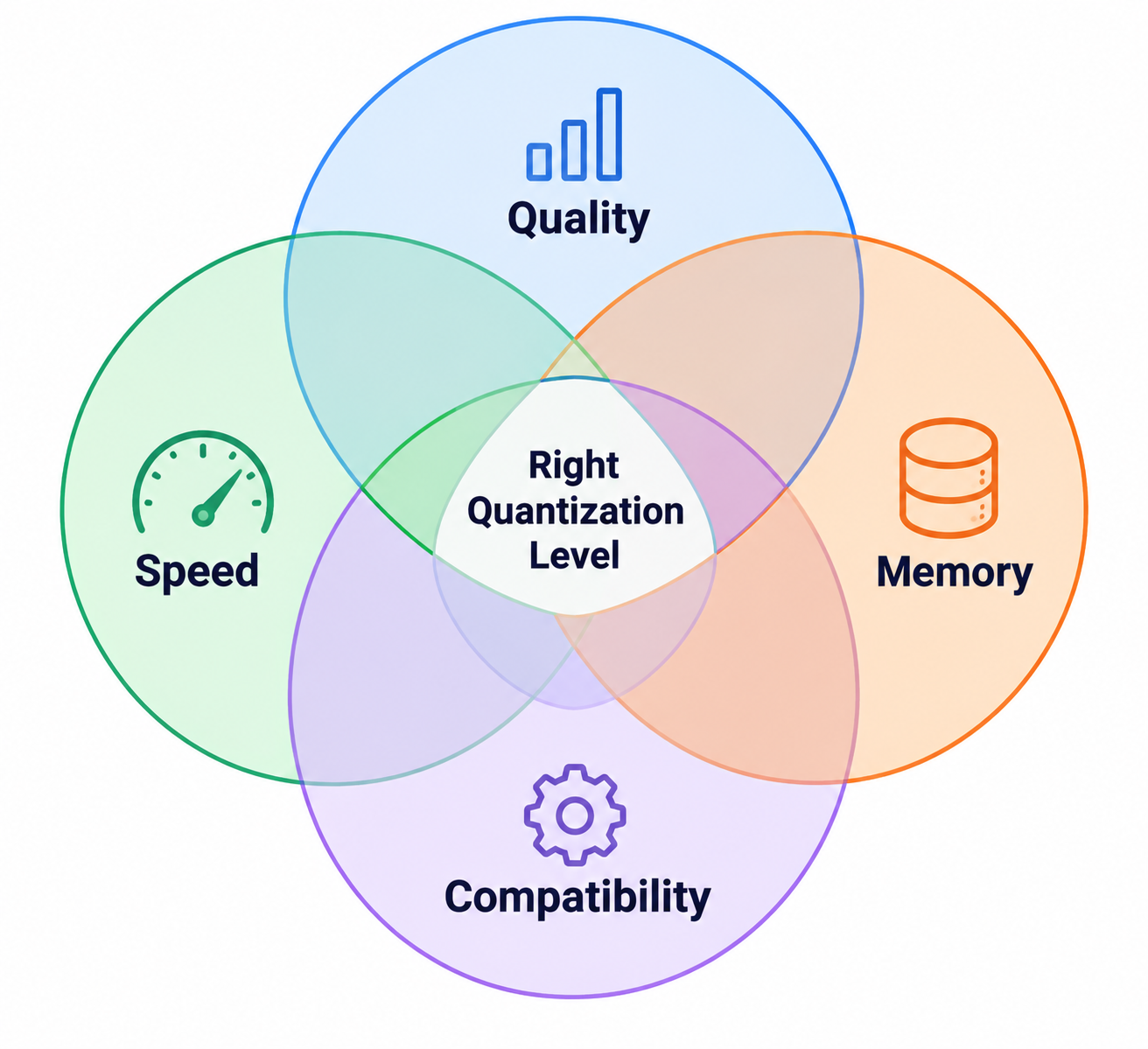
Start with a precision that fits your memory budget while leaving enough room for the runtime and KV cache. Then compare candidate configurations using representative prompts and tasks.
Evaluate at least four factors:
- Quality: Task accuracy, instruction following and common failure cases.
- Speed: Tokens per second and time to first token.
- Memory: Peak RAM and VRAM during actual inference.
- Compatibility: Whether your chosen runtime supports the model and quantization format.
Test on the target hardware rather than relying only on file size or generic benchmark claims.
How do you Run a Quantized LLM with llama.cpp or Ollama?
You can run a compatible GGUF model with llama.cpp, or use Ollama to run a model available in its library. For custom local models, follow the relevant runtime's supported import or conversion workflow and verify compatibility before deployment.
How do you run a GGUF model using llama.cpp?
After installing a compatible version of llama.cpp and obtaining a supported GGUF model, run:
llama-cli -m ./model-Q4_K_M.gguf -p "Explain quantization in LLMs."
Here, -m specifies the local model file and -p provides the prompt. Replace the filename with the actual path to your downloaded model.
The model must be compatible with the installed version of llama.cpp. If you need to convert or quantize a model, follow the project's official model and quantization documentation. Conversion and quantization are separate from the inference command shown above.
How do you run a model using Ollama?
For a model available in the Ollama library, a basic example is:
ollama run llama3.2
This runs the named model through Ollama; it is not a universal command for loading any arbitrary GPTQ or AWQ file.
For custom GGUF models, consult the official Ollama documentation for its supported model-creation and import workflow. Do not assume that every quantization format can be imported directly.
What should you check before deployment?
Before using a quantized model in production or for local LLM deployment, check:
- Available system RAM and GPU VRAM, including runtime and KV-cache requirements.
- Model architecture, quantization format and inference-engine compatibility.
- Output quality and latency on representative tasks.
- The original model licence and any restrictions on commercial use.
Quantization is a deployment trade-off, not a universal optimisation. Testing the actual model in its intended environment is essential.
Conclusion
LLM quantization helps make large language models more practical to deploy by reducing weight memory, but the best configuration depends on the balance between model quality, memory requirements, inference speed and hardware compatibility.
GPTQ and AWQ are quantization methods; GGUF is a format that supports multiple tensor types and is commonly used with local inference tools. Understanding this distinction makes it easier to choose a suitable deployment workflow.
To build a deeper understanding of model efficiency and other generative AI techniques, explore the Generative AI programme by IIT Delhi, delivered on Varsity by InterviewBit.
Frequently Asked Questions
Is a quantized LLM a different model from the original?
Usually, quantization creates a lower-precision representation of the original model's weights rather than training a new model from scratch. However, quantization error can change the model's outputs and task performance.
Does quantization reduce the number of parameters in an LLM?
No. Weight quantization generally reduces the number of bits used to represent parameters, not the parameter count. Pruning, by contrast, removes parameters or structures, depending on the technique.
Can I quantize a model after fine-tuning it?
Yes, if the model architecture and quantization tools are supported. Evaluate the quantized model after fine-tuning because the effect on quality depends on the model and quantization configuration.
Do GPTQ and AWQ require calibration data?
Common GPTQ and AWQ workflows use representative calibration data to guide quantization. Exact requirements depend on the implementation and tooling being used.
Can I convert a GPTQ model directly into GGUF?
Not universally. Conversion support depends on the architecture, source quantization format and available tools. A supported higher-precision source may be needed if direct conversion is unavailable.
What does Q4_K_M mean in a GGUF model name?
Q4_K_M identifies a particular GGUF quantization variant. It does not guarantee that every tensor uses exactly four bits per parameter, because block metadata and mixed tensor precision can affect effective storage.
How much RAM do I need to run a 7B quantized model?
It depends on the quantization level, context length, runtime and workload. A 4-bit 7B model has a theoretical raw weight estimate of about 3.5 GB using four bits per parameter, but actual requirements are higher because of metadata, runtime buffers and the KV cache.
Is GGUF better than GPTQ for running models locally?
Neither is universally better. GGUF is a file format commonly used with llama.cpp and related local-inference tools, while GPTQ is a quantization method supported by compatible runtimes. Choose according to your hardware and software requirements.
Can quantized models be used for commercial applications?
Potentially, yes. Check the original model licence and any restrictions on commercial use, redistribution or derivatives. Quantization does not remove the licence obligations attached to the original model.
How can I tell whether quantization has damaged model quality?
Compare the quantized model with the original using the same prompts, evaluation set and runtime conditions. Measure task quality, inspect failure cases, and record latency and peak memory to understand the trade-offs.
Resources
- GPTQ: Accurate Post-Training Quantization for Generative Pre-trained Transformers
- AWQ: Activation-aware Weight Quantization for LLM Compression and Acceleration
- LLM.int8(): 8-bit Matrix Multiplication for Transformers at Scale
- LLM Compressor Documentation
- Hugging Face Transformers Quantization Documentation
- llama.cpp: Official Repository and Documentation
- llama.cpp Model Documentation
- Ollama Official Documentation