Q# Explained: Microsoft’s Quantum Programming Language Made Easy

Key Insights
- Q# is Microsoft’s open-source quantum language. It ships inside the free Microsoft Quantum Development Kit (QDK), which also bundles simulators, noise models, a circuit editor, a resource estimator and debugging tools.
- Quantum and classical code are separated by design. Operations can change qubit states, while functions are deterministic and can only call other functions. This split keeps quantum logic contained and easier to reason about.
- Qubits follow strict rules. Every qubit is allocated in the |0⟩ state and must be returned to |0⟩ before release; skipping Reset causes a runtime error. A Hadamard gate gives a 50% chance of measuring Zero or One, so repeated runs return a distribution, not one fixed answer.
- Setup takes two main tools. You need the QDK extension for VS Code and, for Python or Jupyter work, the qdk package, which requires Python 3.10 or later (3.11 recommended). VS Code for the Web runs Q# with no install but does not support Python, Qiskit or Cirq programs.
- Local simulation is free and needs no Azure account. The QDK offers four local simulators: sparse (the VS Code default), stabilizer, GPU and CPU. An Azure account and quantum workspace are needed only to submit jobs to real hardware.
- Four hardware providers are available through Azure Quantum. Microsoft’s target list names IonQ, Pasqal, Quantinuum and Rigetti, covering trapped-ion, neutral-atom and superconducting qubits. Listed devices range from the 25-qubit IonQ Aria 1 to the 108-qubit Rigetti Cepheus-1-108Q.
- Hardware limits classical logic. Base-profile targets cannot compare measurement results, Adaptive RI targets allow if statements on mid-circuit measurements, and no current hardware supports the Unrestricted profile, which runs only on QDK simulators.
- Q#, Qiskit and Cirq differ mainly in style. Q# is a dedicated quantum language, while Qiskit (v2.6.0, Python 3.10+) and Cirq (v1.7.0, Python 3.11+) are Apache-2.0 Python libraries. The QDK Python package also works with Qiskit, Cirq and OpenQASM, so the choice is less exclusive than it looks.
- Q# does not guarantee a quantum speedup. Full state-vector simulation memory doubles with every added qubit, real devices are noisy, and any advantage must be shown by benchmarking against the best classical method.
The Q# programming language is Microsoft’s domain-specific language for writing quantum algorithms and programs. It gives developers a structured way to work with qubits, describe quantum operations, and combine those steps with familiar classical logic.
Q# sits at the center of quantum programming with Microsoft. It is part of the free Quantum Development Kit, which provides tools for writing, simulating and debugging programs, and connects to Azure Quantum when you want to run on real hardware. You can learn and experiment entirely on simulators, with no quantum computer required.
This guide covers how Q# works, its core features, a beginner-friendly example, setup, common operations, and how it compares with Qiskit and Cirq.
How does the Q# Programming Language Work?
Q# lets you express a quantum algorithm with dedicated constructs for qubits, quantum operations and measurements, alongside ordinary classical control flow. The same program can run on a local simulator or be submitted to a supported quantum target. The language describes the computation, and the execution target decides how it physically runs.
How Q# Represents Quantum Computations?
Q# models a quantum program as a sequence of operations applied to qubits, ending in measurements that produce classical data. These three building blocks appear in every Q# program, so understanding them makes the rest of the language much easier to follow.
- Qubits hold quantum information. In Q#, a qubit is a Qubit type you can only act on through operations. You cannot read or copy its state directly, which matches the rules of quantum physics.
- Operations transform the quantum state. Applying a gate such as H changes the qubit’s state rather than assigning it a new value.
- Measurement produces a classical result. It returns a Result of Zero or One, which ordinary code can then use.
This is the key difference from classical variables. Updating an Int overwrites a stored value, while a quantum operation evolves a state that only becomes a single classical value when it is measured.
How Q# Combines Classical and Quantum Logic?
Most quantum algorithms need classical steps around the quantum ones, for counting, looping or deciding what to do next. Q# lets both kinds of logic live in the same program, so you do not need a separate language to coordinate them.
- Classical variables such as Int, Double, Bool and arrays handle ordinary calculations and loop counters.
- Quantum operations act on qubits to change their state.
- Measurement results can feed if statements and loops, where the target supports it.
- One combined algorithm emerges: for example, a repeat-until-success loop applies quantum steps, measures, and repeats until a classical condition is met.
Support for measurement-based branching varies by hardware. Microsoft groups targets into profiles: Base targets cannot compare measurement results at all, while Adaptive targets can branch on mid-circuit measurements.
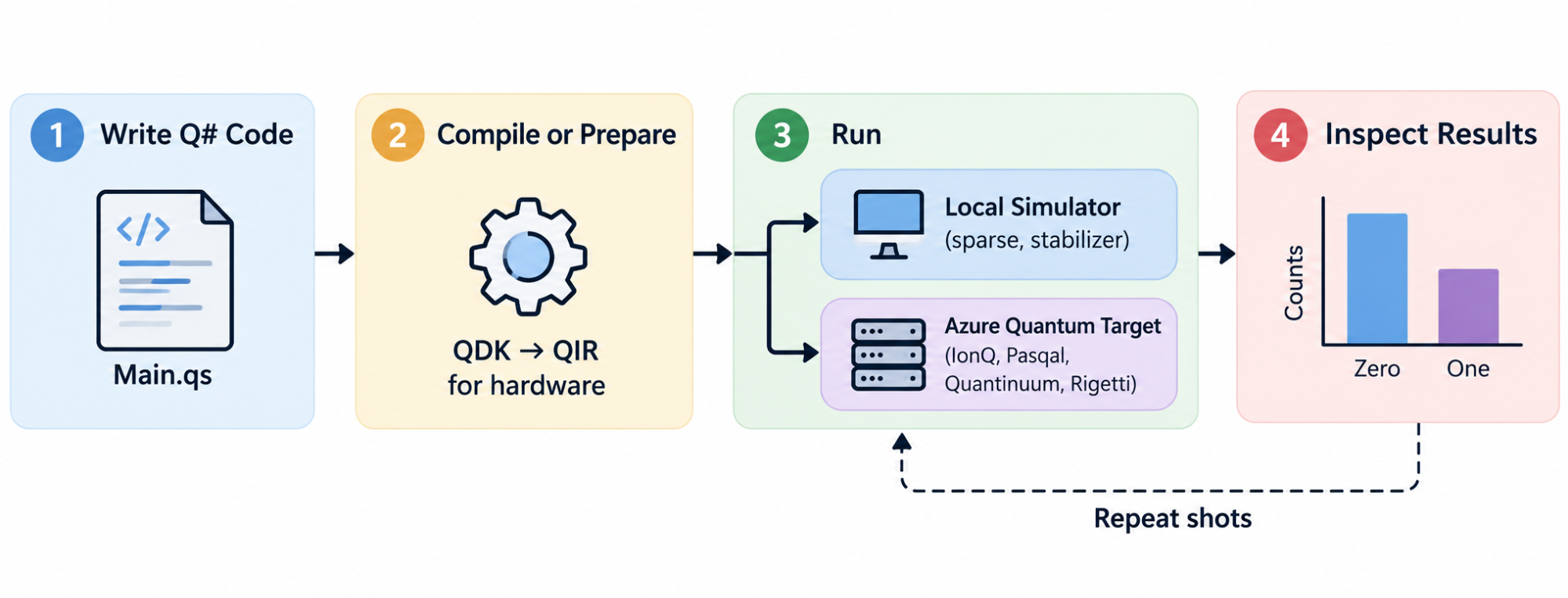
How a Q# Program Is Executed?
A Q# program moves through a short, repeatable cycle from source code to results. Because quantum outcomes are probabilistic, the cycle usually ends with running the program many times rather than once.
- Write the algorithm in a .qs file using Q# syntax.
- Compile or prepare it with the QDK tools. For hardware jobs, the program is converted to Quantum Intermediate Representation (QIR), a format that does not depend on the language or the hardware.
- Run it on a local simulator or a supported Azure Quantum target.
- Inspect the measurement results, and repeat with more shots when you need a reliable distribution.
Key point: Q# describes the quantum computation. The simulator or quantum execution target determines how, and how faithfully, that computation is carried out.
What are the Key Features of Q#?
Q# combines purpose-built quantum constructs with familiar programming concepts such as types, variables and loops. These features help you manage qubits safely, organize algorithms into reusable pieces, and test them before running anything on hardware.
Qubit Management
Qubits are the basic units of quantum information, and Q# treats them as resources with strict rules. You allocate them with the use keyword, and every qubit starts in the |0⟩ state.
Before a qubit is released at the end of its scope, it must be returned to |0⟩, usually with Reset. Skipping this step causes a runtime error, because leftover quantum states could disturb later computations on real hardware.
A qubit is not a Boolean variable. It can be in a superposition of |0⟩ and |1⟩, and you only obtain a definite 0 or 1 by measuring it.
Quantum Operations and Functions
Q# has two kinds of callables, and choosing the right one matters. Operations can act on qubits and produce quantum effects, while functions are purely classical and always return the same output for the same input.
- Operations apply gates, allocate qubits and take measurements. An operation can call other operations and functions, so you can build larger routines from smaller ones.
- Functions handle classical calculations, such as computing a rotation angle or processing a result array. A function can only call other functions, never operations.
Splitting code this way keeps quantum logic in small, reusable units. You can reason about a function like ordinary code, then compose operations into a full algorithm.
Measurement and Classical Results
Measurement is how a Q# program gets classical information out of a quantum state. The M operation measures a qubit in the computational (Pauli Z) basis and returns a Result of Zero or One.
Measurement also changes the qubit, because a superposition collapses to the observed outcome. The state before measurement holds probabilities, while the result you observe is one sample from them.
Your algorithm can then use that Result to decide later steps, such as whether to apply a correction gate.
Classical Control Flow
Q# supports if statements, for and while loops, and a repeat…until loop with an optional fixup block. This classical logic decides when and how quantum operations are applied, and reusable callables keep it organized.
A measurement outcome can steer later operations, for example applying an X gate only when a result is One. Simulators handle this fully, while hardware support depends on the target’s profile.
Control flow does not remove randomness. An if statement can react to a measurement, but it cannot make the measurement itself predictable.
Quantum Simulation and Development Tools
The QDK lets you test Q# programs on your own machine before using any hardware. Its simulators, debugger and estimation tools make it practical to check small circuits first and scale up gradually.
- Simulators: The sparse simulator is the default in VS Code and can add Pauli noise to mimic hardware errors. A stabilizer simulator handles wide, Clifford-dominated circuits, and GPU and CPU simulators are available for Qiskit and QIR programs.
- Debugging: You can set breakpoints, step through code and watch qubit states in VS Code. DumpMachine prints the current state without stopping the program.
- Resource estimation: The resource estimator predicts the physical qubits and runtime a program would need on a fault-tolerant machine.
Practical circuit size depends on the simulator and the shape of the quantum state. The sparse simulator saves memory when most amplitudes are zero, but heavily entangled states still become expensive to simulate.
What does Q# Code Look Like? A Beginner-Friendly Example
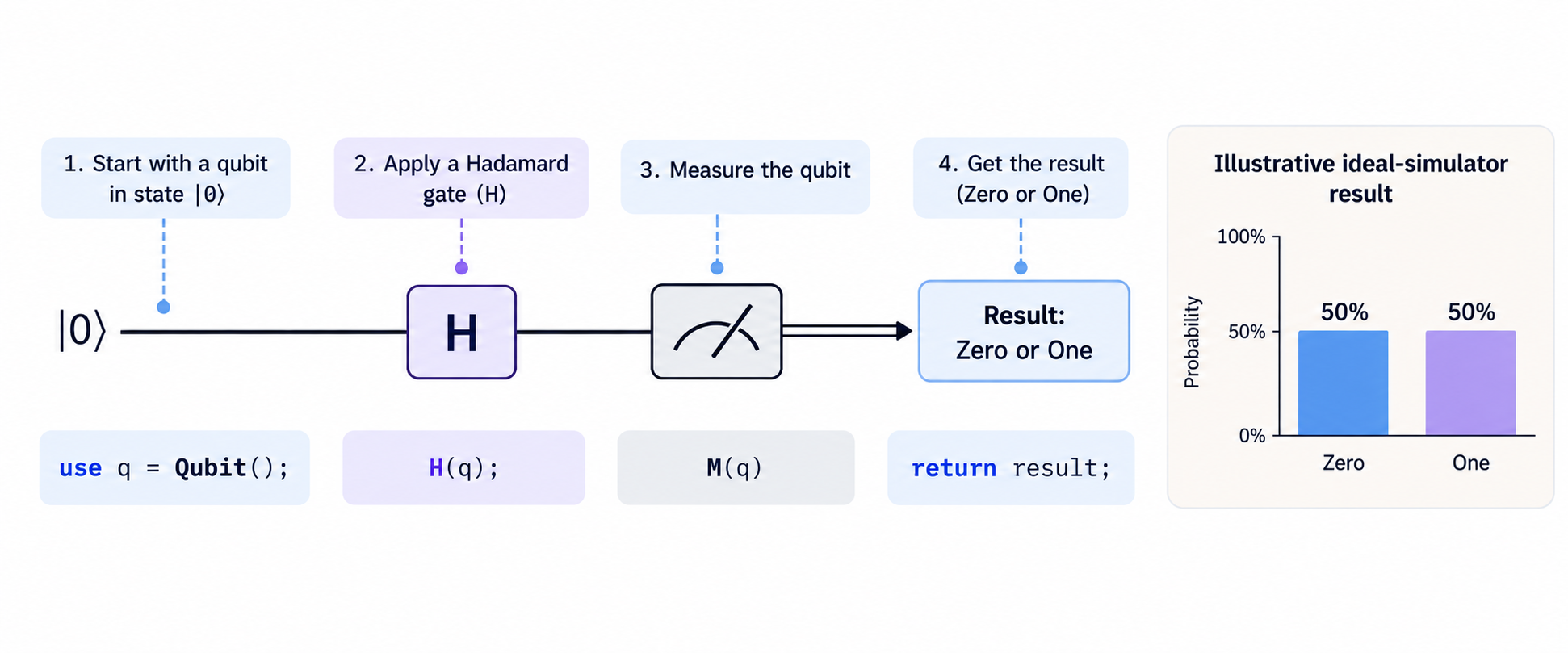
A short program is the fastest way to connect Q# syntax with the concepts above. The example in this section allocates one qubit, applies a Hadamard gate, measures it, and returns a classical result in just a few lines of code.
Understand the Structure of a Q# Program
Modern Q# programs need very little boilerplate. A namespace is optional, and execution starts from an operation named Main unless you mark a different operation with the @EntryPoint() attribute.
- Entry point: Main is where the program begins. Other operations can be defined alongside it and called as reusable steps.
- Variables: let binds a value that cannot change, while mutable declares one you can update later.
- Qubit allocation and release: use allocates qubits for the current block, and they are released when the block ends.
- Classical output: The return type, such as Result, defines the classical value the program hands back.
Example: Create and Measure a Qubit
The program below places one qubit in an equal superposition and then measures it. It uses only built-in operations that Q# loads automatically, so no import statements are needed.
operation Main() : Result {
// Allocate one qubit. It starts in the |0⟩ state.
use q = Qubit();
// Apply the Hadamard gate to create an equal superposition.
H(q);
// Measure the qubit in the computational (Z) basis.
    let result = M(q);
    // Return the qubit to |0⟩ before it is released.
    Reset(q);
    return result;
}
Each line maps to one step of the experiment:
- use q = Qubit(); allocates a qubit in the |0⟩ state.
- H(q); applies the Hadamard gate.
- M(q) measures the qubit and returns Zero or One.
- Reset(q); satisfies the rule that qubits must be in |0⟩ when released.
- return result; passes the classical outcome back to the caller.
With an ideal simulator, each run returns Zero or One with equal probability. A single run cannot be predicted; only the distribution over many runs can. As a shortcut, MResetZ(q) from Std.Measurement measures and resets in one step.
What Happens When the Program Runs?
Running the program takes the qubit from a known starting point to a random classical result. Watching this sequence over many runs is how you confirm that the program behaves as expected.
- The qubit starts in the known state |0⟩.
- The Hadamard operation changes it to an equal superposition of |0⟩ and |1⟩.
- Measurement returns Zero or One and collapses the superposition.
- Repeated runs, called shots, build up a distribution close to 50/50.
In VS Code, you can run the file several times and compare results in the debug console. From Python, qsharp.run(“Main()”, shots=100) collects many results at once. Small samples can look uneven, but the split moves toward 50/50 as shots increase.
Common Beginner Mistakes in Q#
Most early errors in Q# come from carrying classical programming habits into quantum code. Watching for these five mistakes will save you a lot of debugging time.
- Treating a qubit like a Boolean: You cannot read, copy or assign a qubit’s value directly.
- Expecting the same measurement every time: A qubit in superposition gives probabilistic outcomes.
- Confusing operations with functions: A function cannot call quantum operations such as H or M.
- Forgetting to reset qubits: Releasing a qubit that is not in |0⟩ causes a runtime error.
- Expecting a simulator to show speedup: Simulators run on classical hardware and slow down as qubit counts grow.
What are the Most Common Quantum Operations in Q#?
A small set of gates appears in almost every introductory Q# program. Once you know what X, H, Z, CNOT and measurement do to a qubit’s state, you can read most beginner examples line by line.
Pauli-X Gate
The X gate is the closest quantum equivalent of a classical NOT. On computational-basis states it acts like a bit flip, turning |0⟩ into |1⟩ and |1⟩ into |0⟩.
Unlike a classical assignment, X is a reversible transformation of the whole quantum state. Applied to a superposition, it swaps the amplitudes of |0⟩ and |1⟩ rather than setting the qubit to a fixed value. In Q#, you call it with X(q);.
Hadamard Gate
The H gate turns |0⟩ or |1⟩ into an equal superposition, giving a 50% chance of measuring each outcome. It is the same gate used in the beginner example earlier in this article.
Many introductory algorithms begin by applying H to every input qubit so that the computation starts from a superposition of all inputs. Applying H twice returns the qubit to its original state, which is a simple demonstration of interference.
Pauli-Z Gate
The Z gate leaves |0⟩ unchanged and flips the sign, or phase, of the |1⟩ component. Measuring immediately after Z in the computational basis gives exactly the same probabilities as before.
Phase still matters, because later gates can turn it into different measurement probabilities through interference. For example, applying H, then Z, then H changes |0⟩ into |1⟩. Algorithms such as Grover’s search rely on this effect.
CNOT Gate
CNOT is a two-qubit operation with a control qubit and a target qubit. It flips the target only when the control is |1⟩, and you write it in Q# as CNOT(control, target);.
Combined with H, it creates entanglement. Applying H to the control and then CNOT produces a Bell state, in which both qubits always give the same measurement result. This pattern is the foundation of most multi-qubit circuits.
Measurement Operations
Measurement converts quantum information into classical data. In Q#, M(q) measures a single qubit in the computational (Pauli Z) basis, while Measure lets you choose the Pauli basis for one or more qubits.
Outcomes vary across runs whenever the qubit is in a superposition, because each measurement samples from the state’s probabilities. MResetZ measures and resets in one step, which is useful at the end of a program.
Key point: Quantum gates are not simply classical logic instructions. Their effects on quantum states, including phase and interference, are central to how quantum algorithms work.
What can You Build with Q#?
Q# can express anything from a two-gate experiment to a complete quantum algorithm. What a project is worth depends on its goal, whether that is learning, research or practical use, and on the simulator or hardware available to run it.
Quantum Circuit Experiments
Small circuit experiments are the best first projects for Q# learners. They build intuition for superposition and entanglement and let you check your understanding against answers you can work out by hand.
- Build single-qubit circuits with X, H and Z, then two-qubit circuits with CNOT.
- Create a Bell state and confirm that both qubits always agree when measured.
- Compare simulator results with the probabilities you calculated yourself.
- Modify existing programs one gate at a time and predict each new output before running it.
Quantum Teleportation
Quantum teleportation transfers an unknown qubit state from one qubit to another using a shared entangled pair and two bits of classical communication. It is a classic learning project because it combines entanglement, measurement and classical control in one protocol.
In Q#, you first entangle two qubits, then measure the sender’s qubits. The two measurement results travel as classical data and decide whether X and Z corrections are applied to the receiver’s qubit.
Teleportation does not send information faster than light. The receiver cannot recover the state until the classical results arrive through an ordinary channel.
Grover’s Search Algorithm
Grover’s algorithm searches an unstructured space for items that meet a condition, using about √N queries instead of the roughly N a classical search needs. It is a natural next step once you are comfortable with H, Z and multi-qubit gates.
- Oracle: An operation that marks valid solutions by flipping their phase.
- Amplitude amplification: Repeated steps that increase the probability of measuring a marked item.
- Small simulations: Search spaces of two to four qubits let you verify every result by hand.
The quadratic speedup is a theoretical result. In practice, building the oracle and encoding the problem can cost more than the speedup saves, especially on small problems.
Quantum Error Correction Concepts
Real qubits are fragile, and noise causes errors during gates and measurements. Q# lets you explore how such errors are detected and corrected, which is essential context for anyone moving beyond toy circuits.
- Start with the three-qubit bit-flip code: Encode one logical qubit across three physical qubits and use extra measurements to detect a flip.
- Inject errors on purpose: Use the sparse simulator’s Pauli noise settings to test whether your code catches them.
- Estimate real requirements: Use the resource estimator to see how many physical qubits a fault-tolerant version of an algorithm would need.
These exercises are educational simulations, not fault-tolerant systems. Reliable large-scale quantum computing needs many physical qubits, low error rates and continuous error correction, which goes far beyond writing the algorithm itself.
Q# vs Qiskit vs Cirq: What Is the Difference?
Q#, Qiskit and Cirq all let you write and simulate quantum programs, and all three are open source. They differ in programming model and ecosystem, so the best choice depends on your programming background, preferred workflow and project requirements.
Q# vs Qiskit vs Cirq
The table below compares the three tools on the dimensions that most affect a learner’s day-to-day work. Use it to see which workflow feels closest to the way you already program, rather than to pick an overall winner.
| Feature | Q# | Qiskit | Cirq |
|---|---|---|---|
| Main approach | Domain-specific quantum programming language | Python-based quantum software development framework | Python framework for quantum circuits |
| Ecosystem | Microsoft quantum development ecosystem | IBM quantum ecosystem and broader Python tooling | Google-originated quantum circuit tooling |
| Programming style | Dedicated quantum language constructs | Quantum circuit programming in Python | Quantum circuit programming in Python |
| Learning focus | Expressing quantum algorithms using Q# | Building, simulating and executing quantum circuits | Constructing and simulating quantum circuits |
| Suitable for | Learners interested in Q# and Microsoft’s tools | Python users exploring quantum programming | Python users exploring circuit-level quantum programming |
| Getting started | Follow current Microsoft Q# documentation | Follow official Qiskit documentation | Follow official Cirq documentation |
The biggest practical difference is language versus library. Q# gives you a separate language with quantum-specific rules, while Qiskit and Cirq let you stay in Python. The lines are also blurring, because the QDK Python package works with Qiskit and Cirq alongside Q#.
Which Quantum Programming Tool Should You Choose?
There is no universally best tool, only the one that fits your goals and current skills. The guidelines below can help you decide where to start.
- Choose Q# if you want to learn Microsoft’s quantum programming language and its development ecosystem.
- Choose Qiskit if you want a Python-based framework closely associated with IBM’s quantum ecosystem.
- Choose Cirq if you want a Python framework focused on constructing and simulating quantum circuits.
- Compare before committing: Review current documentation, supported execution targets, project needs and learning resources for each option.
Key point: These tools overlap in purpose but differ in programming model and ecosystem. Learning quantum computing fundamentals makes it easier to move between them.
What Are the Limitations of Q#?
Q# makes quantum algorithms easier to express, but it does not remove the mathematical complexity, hardware limits or practical constraints of quantum computing. Knowing these limits helps you set realistic expectations for both learning and projects.
Quantum Computing Requires Mathematical Foundations
Q# hides some low-level detail, but you still need the underlying math to understand what your code does. Without it, you can write programs that compile and run without knowing whether their output is correct.
- Linear algebra and complex numbers, to describe quantum states and amplitudes.
- Probability and quantum measurement, to interpret results.
- Quantum states and unitary operations, to reason about what each gate does.
- Algorithmic reasoning, to design and analyze quantum routines.
Simulators Have Computational Limits
Simulators run on classical computers, so their cost rises quickly as you add qubits. A full description of n qubits needs 2ⁿ complex amplitudes, which means the memory required doubles with every qubit you add.
- Cost grows with qubit count: Simulation becomes expensive well before qubit counts reach the size of useful algorithms.
- Results depend on the method: The sparse simulator saves memory only when most amplitudes are zero, and the stabilizer simulator is efficient only for Clifford-dominated circuits.
- Simulation is not proof: A successful simulation does not show a practical advantage on quantum hardware.
Hardware Availability and Noise
Real quantum processors are still an emerging technology. They produce noisy results, and each device has its own limits on qubit count, supported operations and classical control.
- Noisy results: Gate and measurement errors mean hardware output differs from ideal simulations.
- Varying targets: Supported operations and profiles differ by device, and Base-profile targets cannot branch on measurement results.
- Access requirements: Hardware runs need an Azure account and workspace, and jobs may involve queues and costs.
Q# does Not Guarantee Quantum Speedup
Writing an algorithm in Q# does not make it faster than a classical program. Any speedup comes from the algorithm and the problem it solves, not from the language used to express it.
- Problem fit: Performance depends on the algorithm and the structure of the problem.
- Overhead: Data preparation, error correction and classical processing all add cost.
- Classical competition: Classical algorithms remain faster for many real-world tasks.
- Benchmarking: Only careful comparison with the best classical method can show a practical advantage.
How can You Learn Q# Step by Step?
A structured learning path takes you from quantum basics to working Q# projects without skipping the concepts that make the code meaningful. Each of the six steps below builds on the one before it.
Step 1: Learn the Quantum Computing Fundamentals
Start with the ideas that Q# is built to express. You do not need deep theory yet, just a clear picture of how qubits and gates behave. Focus on these topics:
- Qubits and quantum states
- Superposition and measurement
- Quantum gates and circuits
- Entanglement and interference
Step 2: Understand the Required Mathematics
The math behind quantum computing is mostly linear algebra with complex numbers. Learning it alongside the fundamentals lets you check your programs’ output by hand. Cover these areas:
- Complex numbers
- Vectors and matrices
- Probability
- Basic linear algebra
Step 3: Learn Q# Syntax and Program Structure
Next, learn how Q# turns those concepts into code. Microsoft’s QDK Learning lessons, which run inside VS Code, pair short theory sections with interactive coding exercises. Prioritize these topics:
- Variables and types
- Functions and operations
- Qubit allocation and release
- Measurement and classical control flow
Step 4: Practice with Small Circuits
Small circuits turn theory into intuition. Predict each result before you run it, then use the simulator to confirm or correct your thinking.
- Apply X, H and Z gates to a single qubit.
- Build a two-qubit circuit with CNOT.
- Explore measurement outcomes over many shots.
- Compare simulated results with theoretical predictions.
Step 5: Implement a Quantum Algorithm
Once small circuits feel comfortable, implement a complete algorithm or protocol. This is where operations, functions and control flow come together in one program.
- Start with a simple algorithm or protocol, such as Deutsch–Jozsa or Bell-state preparation.
- Test it on a simulator.
- Change parameters and observe how the outcomes shift.
- Document what the results demonstrate and what they do not.
Step 6: Explore Advanced Projects
With a working algorithm behind you, move on to projects that combine several concepts at once. These are the same areas covered in the projects section above, now built end to end.
- Quantum teleportation
- Grover’s search algorithm
- Quantum error correction concepts
- Hybrid quantum-classical workflows
Key point: Learn the quantum concepts alongside Q# syntax. Memorizing language constructs without understanding the underlying quantum operations will limit your progress.
Conclusion
Q# provides a structured way to learn quantum programming, build quantum algorithms, and experiment with qubits using Microsoft’s Quantum Development Kit. Its dedicated syntax, built-in operations, simulators, and debugging tools make it easier to explore concepts such as superposition, entanglement, and measurement without needing access to a physical quantum computer.
For beginners, the best approach is to start with basic quantum circuits, understand how Q# handles qubits and measurements, and gradually progress to algorithms such as Grover’s search and quantum teleportation. Although Q# simplifies quantum program development, practical results still depend on the algorithm, simulation limits, and available hardware.
The key takeaway: Learn quantum computing fundamentals alongside Q# syntax, experiment with small programs, and benchmark your algorithms against classical alternatives to understand where quantum computing can offer real advantages.
Turn Your AI Knowledge into Practical Impact
Discover how AI can streamline workflows, support data-driven decision-making, and improve operational efficiency with Certificate Programme in AI-Powered Operations & Process Transformation by IIM Tiruchirappalli.
Explore the programme and learn how to apply AI to real-world operational challenges.
Frequently Asked Questions
What types of applications can be developed using Microsoft Q#?
Q# is built for quantum algorithms and protocols rather than general-purpose apps. Common uses include learning circuits, teleportation and search demos, algorithm research, and error-correction studies. The QDK also supports resource estimation for future fault-tolerant hardware and includes a library for chemistry and materials science work.
How does Q# handle errors and debugging during quantum program development?
The QDK extension for VS Code includes a debugger with breakpoints, step-through execution and a view of qubit states. DumpMachine prints the current state without stopping the program, while Fact and fail stop execution when a condition is not met. Releasing a qubit that has not been reset is reported as a runtime error.
Can Q# programs be integrated with Python or other programming languages?
Yes. The qdk Python package lets you call Q# operations from Python files or write Q# directly in Jupyter cells that start with %%qsharp. The same package also works with Qiskit, Cirq and OpenQASM programs, so projects can mix quantum languages where needed.
What are the system requirements for developing Q# applications?
For local development, you need the latest version of VS Code with the QDK extension, or simply a browser if you use VS Code for the Web. Python work requires Python 3.10 or later, with 3.11 recommended. An Azure account and quantum workspace are needed only when you submit jobs to real hardware.
How difficult is Q# for developers who already know Python or Java?
The syntax will feel familiar, with typed variables, braces, semicolons and standard loops and conditions. The real challenge is the quantum model itself, including superposition, measurement and phase. For most developers, these concepts and the supporting math take longer to learn than the language.
Can Q# be used to develop hybrid quantum-classical applications?
Yes, in two ways. Within Q#, classical logic can react to measurement results, and Adaptive-profile hardware supports branching on mid-circuit measurements. At a higher level, a Python program can call Q# operations, process the results and decide what to run next.
What are the best practices for writing efficient Q# programs?
Efficient Q# code keeps quantum work small and classical work clearly separated. A few habits make the biggest difference to both simulation cost and hardware compatibility:
- Put classical calculations in functions and keep operations focused on quantum steps.
- Allocate only the qubits you need, since simulation cost grows quickly with qubit count.
- Reset qubits, or use MResetZ, as soon as you finish with them.
- Set the target profile early to avoid features your chosen hardware cannot run.
- Run the resource estimator before scaling an algorithm to larger problem sizes.
How can developers test the correctness of a Q# quantum algorithm?
Start with small inputs whose outputs you can calculate by hand. Mark test operations with @Test() so they appear in VS Code’s Test Explorer, and use Fact, CheckZero and DumpMachine to check states and results. For probabilistic outputs, run many shots and compare the distribution with the expected probabilities. Diagnostic checks run only on simulators, so keep them out of code sent to hardware.
What career opportunities are available for developers with Q# programming skills?
Q# skills support roles such as quantum software developer, quantum algorithm researcher and research engineer at universities, labs and companies exploring quantum computing. Few roles require Q# alone. Employers usually look for quantum fundamentals, linear algebra and Python experience, with Q# as one tool among several.
How does Q# support the development of quantum algorithms for optimization problems?
Q# can express the building blocks used in quantum optimization research, such as parameterized rotations, measurements and classical loops. A common pattern pairs a Q# operation with a Python optimizer that adjusts the parameters between runs. Whether this beats classical optimization for a given problem remains an open research question, so benchmark results carefully.
What are the most common challenges developers face when transitioning from classical to quantum programming?
The biggest shifts are conceptual. You cannot inspect or copy a qubit’s state, results are probabilistic, and phase matters even when it does not show up in measurements. Developers also need to replace print-style debugging with simulators, state dumps and statistical checks.
How can developers contribute to open-source quantum computing projects using Q#?
The QDK, including the Q# language tools and the resource estimator, is open source on GitHub in the microsoft/qdk repository. You can report issues, improve samples or documentation, and submit pull requests by following the project’s contribution guidelines. Publishing your own Q# samples and tutorials is another practical way to contribute to the community.
Sources
Microsoft Quantum Development Kit (QDK) Overview