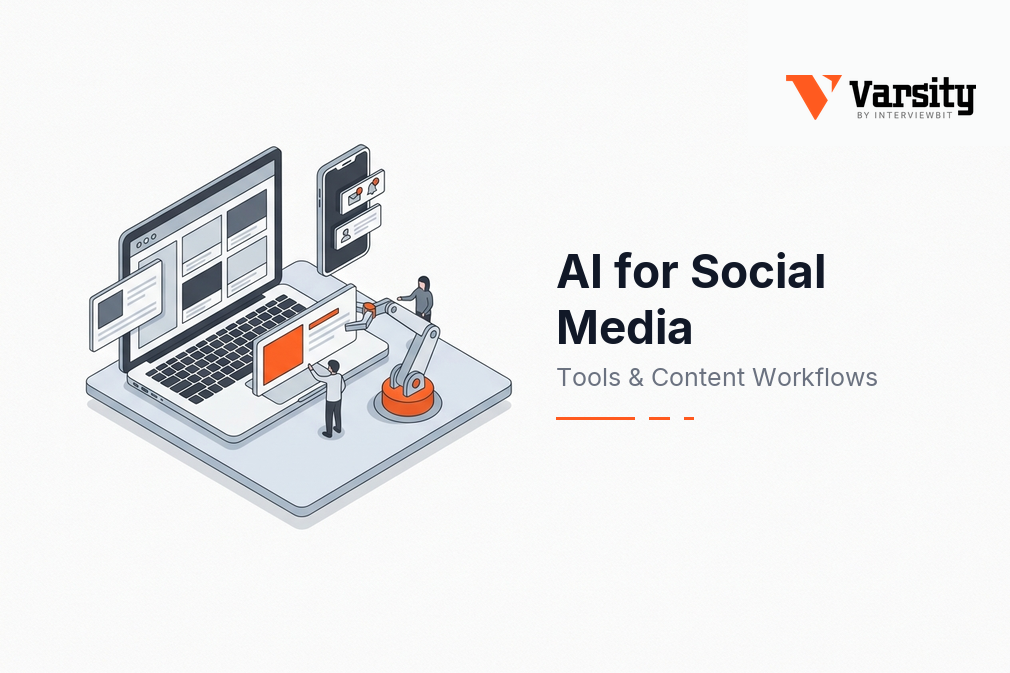
AI for Social Media: Tools & Content Workflows

Key Insights
- Use AI across the social media workflow: AI can support content creation, scheduling, social listening, analytics and advertising.
- Choose tools based on the task: Match AI tools to specific needs, such as content generation, visual creation, publishing or audience analysis.
- Create platform-specific content: Adapt each post to the platform’s format, audience expectations and tone instead of reusing identical content everywhere.
- Keep human review central: Check AI-generated content for accuracy, originality, brand voice and audience relevance before publishing.
- Turn audience data into insights: Use social listening and analytics to identify recurring topics, sentiment shifts and performance patterns.
- Prioritise brand safety: Review copyright, privacy, advertising claims and applicable AI disclosure requirements.
- Build a continuous feedback loop: Use performance insights to refine future content, improve campaigns and strengthen the overall social media strategy.
Social media managers handle much more than posting. They research trends, develop ideas, write copy, adapt content for different platforms, schedule posts, monitor conversations and report on performance.
AI in social media helps with many of these tasks by speeding up content production and turning large amounts of social data into usable insights. It can generate drafts, repurpose content, identify trends, analyse sentiment, support scheduling and help optimise campaigns.
But AI works best as part of a human-led workflow. It can accelerate repetitive work, while people remain responsible for strategy, brand voice, accuracy and final decisions.
This guide covers AI uses, tools, an end-to-end workflow, brand safety, practical examples and common questions.
How is AI Used in Social Media?
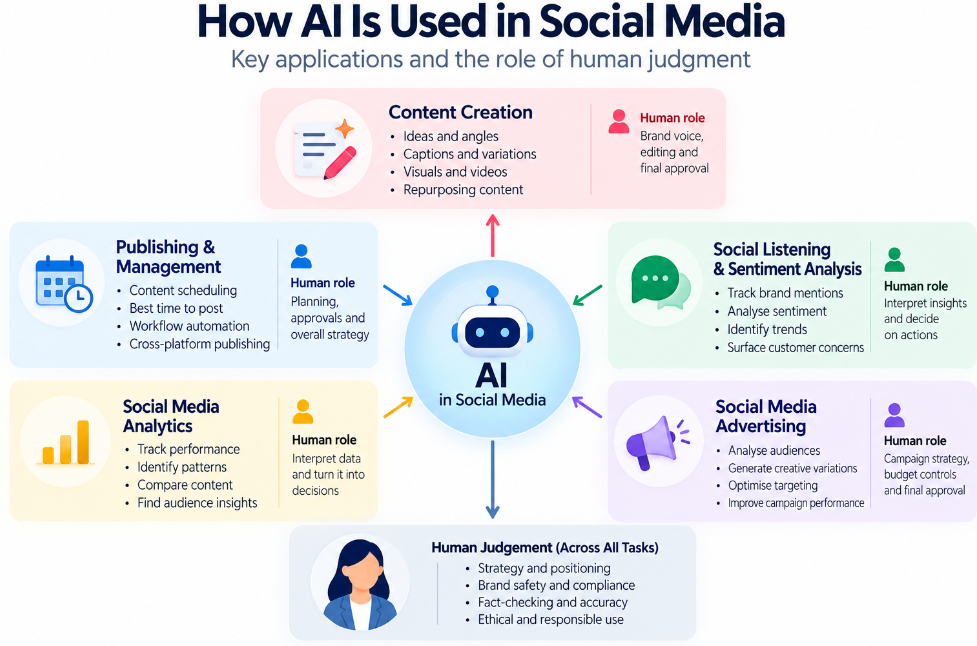
AI is most useful when matched to a specific social media task, with humans retaining control over context, quality and decisions.
| Social media task | How AI helps | Human role |
|---|---|---|
| Content creation | Ideas, drafts, repurposing and variations | Brand voice and editing |
| Publishing & management | Scheduling and workflow automation | Planning and approvals |
| Listening & analytics | Trends, sentiment and performance patterns | Interpretation and decisions |
| Advertising | Audience analysis and creative optimisation | Strategy, budget and approval |
These applications reflect the broader direction of AI social media marketing, where AI is being used for content, analytics, listening, targeting and automation.
Content Ideation
AI can expand one topic into multiple content directions.
Give it the audience, platform, objective and brand voice, then use its suggestions to explore angles, hooks and repurposing opportunities. The social media manager still decides which ideas fit the strategy.
AI Social Media Post Generation
An AI social media post generator can turn a brief into platform-specific drafts.
Use it for captions, hooks, tone variations and repurposing. For example, one article can become separate LinkedIn, Instagram and X drafts rather than one copy-pasted post.
Human check: Does the draft sound like the brand?
Image and Video Creation
AI can reduce the production time needed to create and adapt social visuals.
It can assist with concepts, image editing, video edits, subtitles, resizing and platform adaptations. Creative direction and final selection should remain with the social media team.
Scheduling and Content Management
AI can make the publishing process faster once content has been approved.
It can assist with scheduling, publishing workflows, content calendars and queue management. The key is to keep approval before publication rather than letting automation become the decision-maker.
Social Listening and Sentiment Analysis
AI can turn large volumes of social conversations into patterns worth investigating.
It can surface recurring topics, sentiment, customer concerns, trends and brand mentions. The valuable step comes next: interpreting those signals and deciding what action they warrant.
Social Media Advertising
AI can help marketers test and optimise paid social campaigns at scale.
It can support audience analysis, creative variations, targeting and optimisation. Marketers should still control the campaign objective, positioning, budget and final approvals.
Social Media Analytics
AI can make large amounts of social performance data easier to interpret.
Instead of stopping at metrics such as increased engagement, use AI to identify what changed, where it changed and which content or audience was involved. Those findings can then guide the next content decision.
What are the Best AI Social Media Tools?
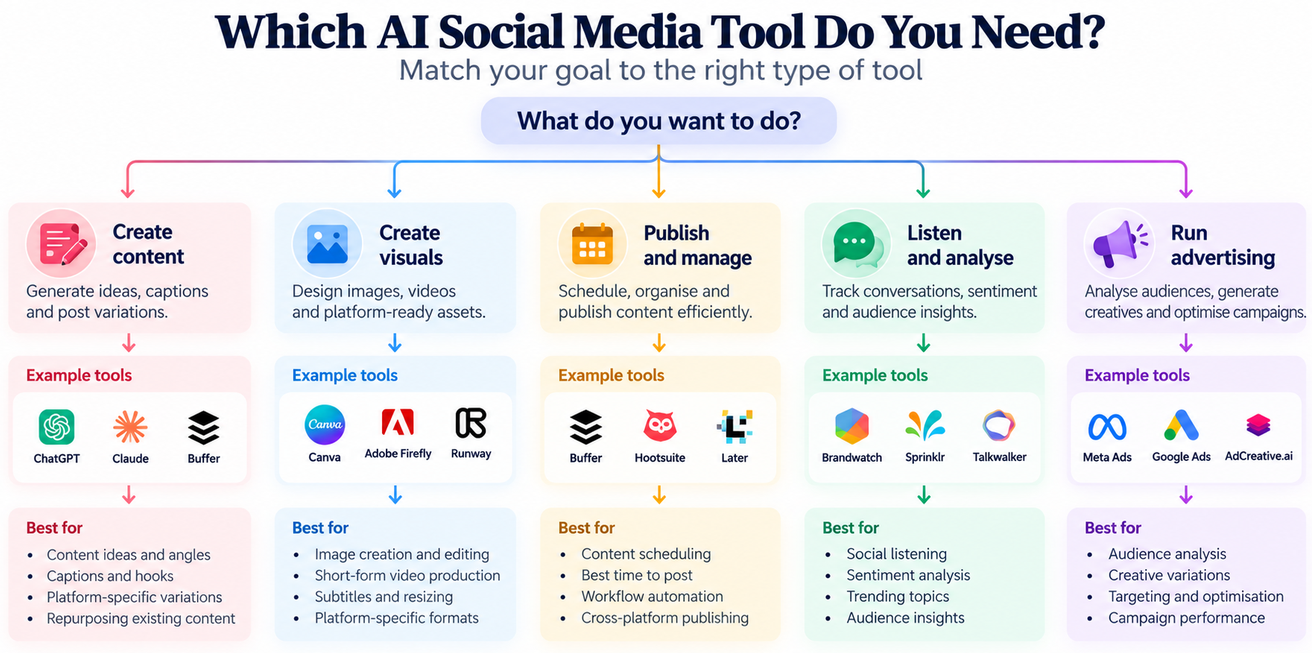
The best AI social media tool depends on the task you need to solve. Instead of choosing a tool because it is popular, start with the workflow gap.
| Tool/category | Primary use | Best suited for |
|---|---|---|
| Generative AI assistants | Ideation, copy and repurposing | Content planning |
| AI design/video tools | Visual creation and editing | Social creatives |
| Social management platforms | Scheduling, publishing and analytics | Content operations |
| Social listening platforms | Monitoring and sentiment | Audience insights |
| Platform-native AI | Ads and optimisation | Paid social |
For example, Buffer combines AI-assisted content creation with publishing workflows, while enterprise platforms such as Sprinklr combine publishing, listening, engagement and analytics.
Tool-Selection Principle
Choose the tool based on the job:
- Need content → generator
- Need visuals → design/video AI
- Need publishing → social management platform
- Need audience insights → listening/analytics platform
- Need campaign optimisation → advertising/platform AI
This prevents a common mistake: trying to make one AI tool handle every part of the social media workflow.
How Do You Build an AI-Powered Social Media Workflow?
A useful AI social media workflow connects planning, creation, review, publishing and analysis instead of treating AI as a standalone content generator.
1. Define the Content Goal
Start with the audience, platform and desired outcome.
Before using AI, establish:
- Who is this for?
- Which platform is it for?
- What should the audience do or understand?
- What role does this content play in the wider strategy?
A weak brief produces generic AI output. A specific brief gives the model something useful to work with.
2. Generate and Prioritise Ideas
Use AI to expand the idea pool, then choose what deserves attention.
AI can suggest angles, hooks, trends and repurposing opportunities. The social media manager decides which ideas fit the audience and current strategy.
3. Create Platform-Specific Drafts
Generate separate drafts for each platform instead of copying the same post everywhere.
Consider:
- Format
- Length
- Audience expectations
- Tone
- Call to action
- Platform behaviour
One idea can become several pieces of content without becoming repetitive.
4. Create or Adapt Visual Assets
Use the appropriate AI tool to create or adapt visuals after the content direction is clear.
This may include resizing an existing asset, creating variations or adapting a video for another platform.
5. Review for Brand Voice and Accuracy
Human review is the quality-control stage of the workflow.
Check:
- Tone
- Claims
- Facts
- Brand language
- Audience relevance
- Sensitive content
- Visual accuracy
Do not treat an AI-generated draft as a finished post.
6. Schedule and Publish
Move approved content into the publishing workflow.
AI can assist with scheduling and workflow automation, but approval should happen before content goes live.
7. Listen and Analyse
Use AI to turn audience conversations and performance data into patterns.
Look for:
- What people are discussing
- How sentiment is changing
- Which topics are gaining attention
- Which posts are performing differently
- What questions keep appearing
8. Feed Insights Into the Next Content Cycle
The workflow becomes more useful when each cycle informs the next one.
Use:
Plan → Generate → Review → Publish → Analyse → Learn → Plan
This creates a continuous AI-powered content workflow rather than a one-way content-generation process. Pasted markdown

Alt text: AI social media workflow showing planning, content generation, human review, publishing, analysis and learning
What are the Brand Safety and Disclosure Risks of AI Social Media Content?
AI social media content needs human oversight because errors, generic output, privacy issues and disclosure requirements can create brand and compliance risks.
Accuracy and Hallucinated Claims
Fact-check AI-generated claims before publishing.
AI can produce confident-sounding information that is incomplete or incorrect. This matters especially when posts contain statistics, product claims, prices, health information or statements about other companies.
For advertising, claims still need to meet applicable truthfulness and substantiation requirements.
Brand Voice and Generic Content
AI can make content faster, but unchecked output can also make a brand sound interchangeable.
Give AI a clear brand voice, audience and examples, then edit the output rather than publishing the first draft.
Human contribution should become more strategic, not disappear.
Copyright and Content Ownership
Review the rights and licensing conditions attached to AI-generated or AI-assisted assets before commercial use.
The relevant rules can depend on the tool, asset, jurisdiction and how the content was created. Do not assume that “AI-generated” automatically means “free to use.”
Privacy and Customer Data
Do not put confidential or sensitive customer information into an AI system without appropriate safeguards.
Use approved tools and follow your organisation’s data-handling policies, particularly when working with customer messages, private communications or internal campaign information.
AI Disclosure
AI disclosure requirements depend on the platform, content and applicable rules, so check the current requirements before publishing.
For example, Meta uses “AI info” labels in various circumstances and has expanded transparency measures for AI-influenced ads.
TikTok also requires disclosure for certain realistic AI-generated content and continues to expand its AI-content labelling systems.
The safest workflow is therefore:
Create → Check platform rules → Disclose when required → Publish
What are Some Examples of AI in Social Media?
AI social media examples are most useful when they solve a specific content, audience or campaign problem.
Example 1: Turn One Article Into Platform-Specific Content
A SaaS company publishes a long-form article and wants to extend its reach across social platforms.
AI can identify potential angles and draft platform-specific versions. The social media manager then selects the strongest ideas and adapts them to each audience.
Result: One piece of content becomes several relevant social assets without simply duplicating the original.
Example 2: Turn Social Conversations Into Content Ideas
A brand notices that customers repeatedly ask the same question across social channels.
AI can group recurring questions and surface common themes. The team can then turn those themes into FAQs, educational posts or short-form content.
Result: Audience conversations become an input for the content strategy.
Example 3: Create Variations for Paid Social Testing
A campaign team needs several creative versions to test different messages or formats.
AI can help generate variations based on an approved campaign direction. The marketer decides which versions are suitable, runs the tests and compares the results.
Result: The team can test more creative variations while keeping campaign strategy and approval human-led.
These are illustrative workflows, not documented case studies.
Conclusion
AI in social media is most useful when it connects several parts of the workflow. It can help generate ideas, adapt content, analyse conversations, support publishing and surface performance patterns.
The strongest approach is not AI instead of people. It is AI for repetitive and data-heavy work, humans for strategy, judgement and accountability.
The result is a social media workflow that can move faster without becoming careless or generic.
Explore the IIM Tiruchirappalli Certificate Programme in AI-Powered Marketing & Growth Strategy to build broader skills across AI, marketing analytics and growth strategy.
Frequently Asked Questions
Can AI create different social media posts for each platform?
Yes. AI can adapt the same underlying idea to different formats, lengths, tones and audience expectations. Each version should still be reviewed for platform fit rather than published as an automatic copy.
How do you choose an AI social media tool?
Start with the specific workflow problem. If you need copy, look at generative AI tools. For visuals, consider design or video tools. For publishing, use social management platforms. For audience insights, consider listening and analytics tools.
Is it better to use one AI social media tool or several?
It depends on the workflow. An all-in-one platform can simplify publishing and management, while specialist tools may offer deeper capabilities for content, design, listening or analytics.
Can AI help find the best time to post on social media?
Some AI-powered social platforms can analyse historical engagement patterns and suggest publishing times. These recommendations should be treated as starting points because audience behaviour and platform conditions can change.
Can small businesses use AI for social media without expensive software?
Yes. Small teams can start with AI tools for specific tasks such as ideation, drafting, repurposing or basic visual creation instead of adopting a large social media platform immediately. The best choice depends on the team’s workflow and volume.
Can AI repurpose one piece of content across multiple social platforms?
Yes. AI can turn a long-form article, video or other source material into platform-specific drafts. Human editing is still needed to make each version relevant to its platform and audience.
How can you compare AI-generated content with human-created content?
Use the same performance criteria for both. Compare factors such as engagement, conversions, approval time, production time, errors and audience response over a consistent period.
Can AI help explain why a social media post underperformed?
It can help identify patterns in the available performance data, such as differences in format, topic, timing or audience response. Those patterns are starting points for investigation, not proof of why a post failed.
What social media tasks are hardest to automate with AI?
Tasks involving strategy, relationship-building, nuanced audience understanding, sensitive communication and final creative judgement are harder to automate reliably. They depend heavily on context and human decision-making.
How often should an AI social media workflow be reviewed?
Review the workflow whenever performance, audience behaviour, platform requirements or team needs change. Regular performance reviews can also reveal which AI-assisted steps are actually saving time or improving results.
Can AI social media tools work with an existing content calendar?
Yes. AI can support parts of an existing calendar by generating ideas, adapting content, suggesting variations or helping with scheduling. The calendar should remain tied to the broader content strategy rather than becoming a list of AI-generated posts.
What should a team check before approving AI-generated social content?
Check factual accuracy, brand voice, audience relevance, claims, visual accuracy, sensitive content and any applicable platform disclosure requirements. Approval should happen before publication.