Practice
Resources
Contests
Online IDE
New
Free Mock
Events New Scaler
Practice
Improve your coding skills with our resources
Contests
Compete in popular contests with top coders
logo
Events
Attend free live masterclass hosted by top tech professionals
New
Scaler
Explore Offerings by SCALER
exit-intent-icon

Download Interview guide PDF

Before you leave, take this MongoDB Interview Questions interview guide with you.
Get a Free Personalized Career Roadmap
Answer 4 simple questions about you and get a path to a lucrative career
expand-icon Expand in New Tab
/ Interview Guides / MongoDB Interview Questions

MongoDB Interview Questions

Last Updated: Dec 23, 2024

Download PDF


Your requested download is ready!
Click here to download.
Certificate included
About the Speaker
What will you Learn?
Register Now

Introduction to MongoDB

When dealing with data, there are two types of data as we know – (i) structured data and (ii) unstructured data. Structured data is usually stored in a tabular form whereas unstructured data is not. To manage huge sets of unstructured data like log or IoT data, a NoSQL database is used.

What is MongoDB ?

  • MongoDB is an open-source NoSQL database written in C++ language. It uses JSON-like documents with optional schemas.
  • It provides easy scalability and is a cross-platform, document-oriented database.
  • MongoDB works on the concept of Collection and Document.
  • It combines the ability to scale out with features such as secondary indexes, range queries, sorting, aggregations, and geospatial indexes.
  • MongoDB is developed by MongoDB Inc. and licensed under the Server Side Public License (SSPL).

MongoDB Basic Interview Questions

1. What are the data types in MongoDB?

MongoDB supports a wide range of data types as values in documents. Documents in MongoDB are similar to objects in JavaScript. Along with JSON’s essential key/value–pair nature, MongoDB adds support for a number of additional data types. The common data types in MongoDB are:

  • Null
    {"x" : null}
  • Boolean
    {"x" : true}
  • Number
    {"x" : 4}
  • String
    {"x" : "foobar"}
  • Date
    {"x" : new Date()}
  • Regular expression
    {"x" : /foobar/i}
  • Array
    {"x" : ["a", "b", "c"]}
  • Embedded document
    {"x" : {"foo" : "bar"}}
  • Object ID
    {"x" : ObjectId()}
  • Binary Data
    Binary data is a string of arbitrary bytes.
  • Code
    {"x" : function() { /* ... */ }}
Create a free personalised study plan Create a FREE custom study plan
Get into your dream companies with expert guidance
Get into your dream companies with expert..
Real-Life Problems
Prep for Target Roles
Custom Plan Duration
Flexible Plans

2. What are some of the advantages of MongoDB?

Some advantages of MongoDB are as follows:

  • MongoDB supports field, range-based, string pattern matching type queries. for searching the data in the database 
  • MongoDB support primary and secondary index on any fields
  • MongoDB basically uses JavaScript objects in place of procedures
  • MongoDB uses a dynamic database schema
  • MongoDB is very easy to scale up or down
  • MongoDB has inbuilt support for data partitioning (Sharding).

3. When to use MongoDB?

You should use MongoDB when you are building internet and business applications that need to evolve quickly and scale elegantly. MongoDB is popular with developers of all kinds who are building scalable applications using agile methodologies.
MongoDB is a great choice if one needs to:

  • Support a rapid iterative development.
  • Scale to high levels of read and write traffic - MongoDB supports horizontal scaling through Sharding, distributing data across several machines, and facilitating high throughput operations with large sets of data.
  • Scale your data repository to a massive size.
  • Evolve the type of deployment as the business changes.
  • Store, manage and search data with text, geospatial, or time-series dimensions.
You can download a PDF version of Mongodb Interview Questions.

Download PDF


Your requested download is ready!
Click here to download.

4. How to perform queries in MongoDB?

The find method is used to perform queries in MongoDB. Querying returns a subset of documents in a collection, from no documents at all to the entire collection. Which documents get returned is determined by the first argument to find, which is a document specifying the query criteria.

Example:
> db.users.find({"age" : 24})

5. How do you Delete a Document?

The CRUD API in MongoDB provides deleteOne and deleteMany for this purpose. Both of these methods take a filter document as their first parameter. The filter specifies a set of criteria to match against in removing documents.

For example:
> db.books.deleteOne({"_id" : 3})

Explore InterviewBit’s Exclusive Live Events

Explore Exclusive Events
By
No More Events to show!
Certificate included
About the Speaker
What will you Learn?
Register Now

6. How do you Update a Document?

Once a document is stored in the database, it can be changed using one of several update methods: updateOne, updateMany, and replaceOne. updateOne and updateMany each takes a filter document as their first parameter and a modifier document, which describes changes to make, as the second parameter. replaceOne also takes a filter as the first parameter, but as the second parameter replaceOne expects a document with which it will replace the document matching the filter.

For example, in order to replace a document:

{
   "_id" : ObjectId("4b2b9f67a1f631733d917a7a"),
   "name" : "alice",
   "friends" : 24,
   "enemies" : 2
}

7. How to add data in MongoDB?

The basic method for adding data to MongoDB is “inserts”. To insert a single document, use the collection’s insertOne method:

> db.books.insertOne({"title" : "Start With Why"})

For inserting multiple documents into a collection, we use insertMany. This method enables passing an array of documents to the database.
Start Your Coding Journey With Tracks Start Your Coding Journey With Tracks
Master Data Structures and Algorithms with our Learning Tracks
Master Data Structures and Algorithms
Topic Buckets
Mock Assessments
Reading Material
Earn a Certificate

8. What are some features of MongoDB?

  • Indexing: It supports generic secondary indexes and provides unique, compound, geospatial, and full-text indexing capabilities as well.
  • Aggregation: It provides an aggregation framework based on the concept of data processing pipelines.
  • Special collection and index types: It supports time-to-live (TTL) collections for data that should expire at a certain time
  • File storage: It supports an easy-to-use protocol for storing large files and file metadata.
  • Sharding: Sharding is the process of splitting data up across machines.

9. How does Scale-Out occur in MongoDB?

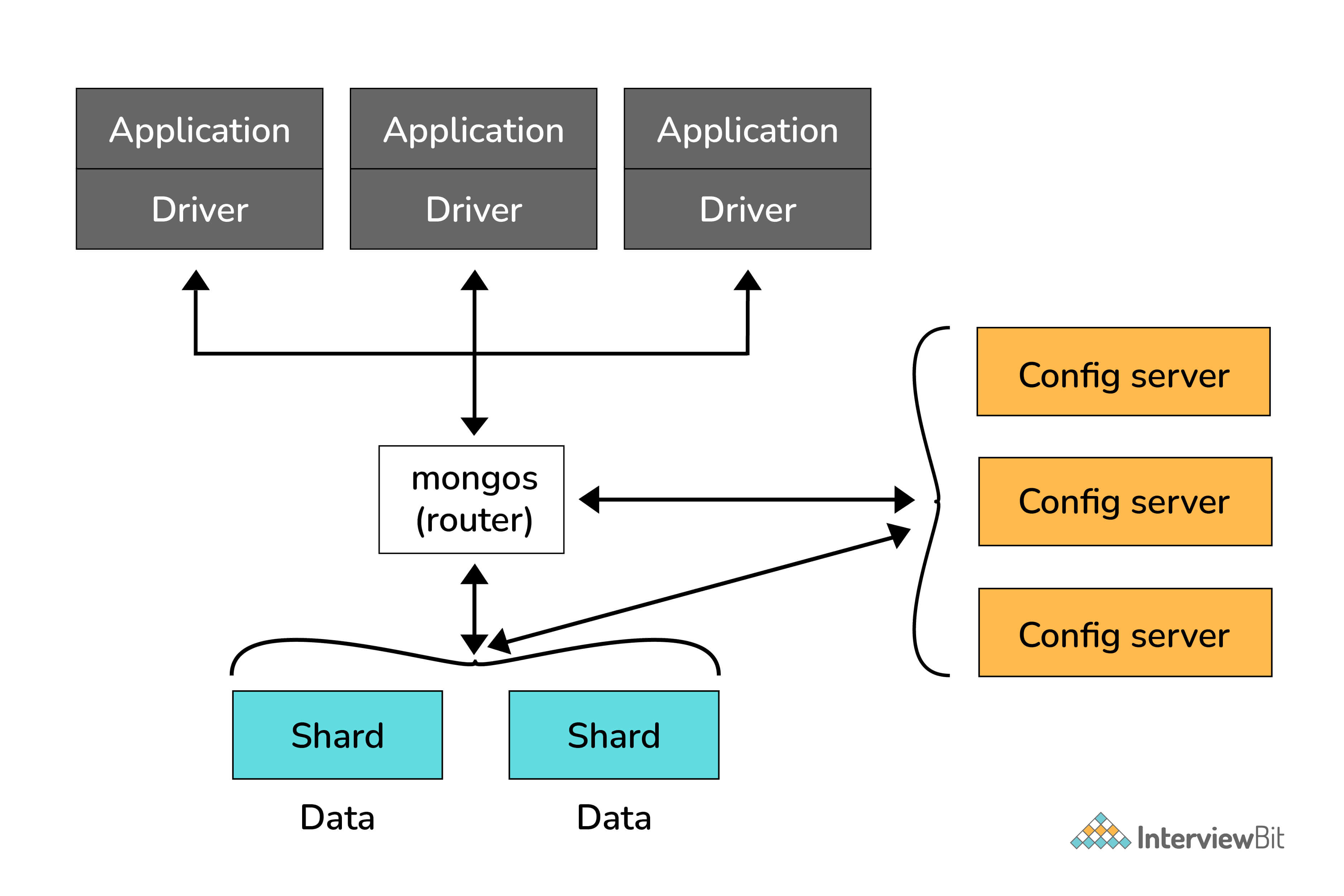
The document-oriented data model of MongoDB makes it easier to split data across multiple servers. Balancing and loading data across a cluster is done by MongoDB. It then redistributes documents automatically.

The mongos acts as a query router, providing an interface between client applications and the sharded cluster.

Config servers store metadata and configuration settings for the cluster. MongoDB uses the config servers to manage distributed locks. Each sharded cluster must have its own config servers. 
10. What is the Mongo Shell?

It is a JavaScript shell that allows interaction with a MongoDB instance from the command line. With that one can perform administrative functions, inspecting an instance, or exploring MongoDB. 

To start the shell, run the mongo executable:

$ mongod
$ mongo
MongoDB shell version: 4.2.0
connecting to: test
>

The shell is a full-featured JavaScript interpreter, capable of running arbitrary JavaScript programs. Let’s see how basic math works on this:

> x = 100;
200
> x / 5;
20

11. What are Databases in MongoDB?

MongoDB groups collections into databases. MongoDB can host several databases, each grouping together collections. 
Some reserved database names are as follows:
admin
local
config

12. What is a Collection in MongoDB?

A collection in MongoDB is a group of documents. If a document is the MongoDB analog of a row in a relational database, then a collection can be thought of as the analog to a table.
Documents within a single collection can have any number of different “shapes.”, i.e. collections have dynamic schemas. 
For example, both of the following documents could be stored in a single collection:

{"greeting" : "Hello world!", "views": 3}
{"signoff": "Good bye"}

Discover your path to a   Discover your path to a   Successful Tech Career for FREE! Successful Tech Career!
Answer 4 simple questions & get a career plan tailored for you
Interview Process
CTC & Designation
Projects on the Job
Referral System
Try It Out
2 Lakh+ Roadmaps Created

13. What is a Document in MongoDB?

A Document in MongoDB is an ordered set of keys with associated values. It is represented by a map, hash, or dictionary. In JavaScript, documents are represented as objects:
{"greeting" : "Hello world!"}

Complex documents will contain multiple key/value pairs:
{"greeting" : "Hello world!", "views" : 3}

MongoDB Intermediate Interview Questions

1. Explain the SET Modifier in MongoDB?

If the value of a field does not yet exist, the "$set" sets the value. This can be useful for updating schemas or adding user-defined keys.

Example:

> db.users.findOne()
{
   "_id" : ObjectId("4b253b067525f35f94b60a31"),
   "name" : "alice",
   "age" : 23,
   "sex" : "female",
   "location" : "India"
}

To add a field to this, we use “$set”:

> db.users.updateOne({"_id" : 
ObjectId("4b253b067525f35f94b60a31")},
... {"$set" : {"favorite book" : "Start with Why"}}) 

2. Explain the process of Sharding.

Sharding is the process of splitting data up across machines. We also use the term “partitioning” sometimes to describe this concept. We can store more data and handle more load without requiring larger or more powerful machines, by putting a subset of data on each machine.
In the figure below, RS0 and RS1 are shards. MongoDB’s sharding allows you to create a cluster of many machines (shards) and break up a collection across them, putting a subset of data on each shard. This allows your application to grow beyond the resource limits of a standalone server or replica set.

Sharded Client Connection
Non Sharded Client Connection

3. What are Geospatial Indexes in MongoDB?

MongoDB has two types of geospatial indexes: 2dsphere and 2d. 2dsphere indexes work with spherical geometries that model the surface of the earth based on the WGS84 datum. This datum model the surface of the earth as an oblate spheroid, meaning that there is some flattening at the poles. Distance calculations using 2sphere indexes, therefore, take the shape of the earth into account and provide a more accurate treatment of distance between, for example, two cities, than do 2d indexes. Use 2d indexes for points stored on a two-dimensional plane.

2dsphere allows you to specify geometries for points, lines, and polygons in the GeoJSON format. A point is given by a two-element array, representing [longitude, latitude]:

{
   "name" : "New York City",
   "loc" : {
       "type" : "Point",
       "coordinates" : [50, 2]
   }
}

A line is given by an array of points:

{
   "name" : "Hudson River",
   "loc" : {
       "type" : "LineString",
       "coordinates" : [[0,1], [0,2], [1,2]]
   }
}

4. Explain the term “Indexing” in MongoDB.

In MongoDB, indexes help in efficiently resolving queries. What an Index does is that it stores a small part of the data set in a form that is easy to traverse. The index stores the value of the specific field or set of fields, ordered by the value of the field as specified in the index. 
MongoDB’s indexes work almost identically to typical relational database indexes.

Indexes look at an ordered list with references to the content. These in turn allow MongoDB to query orders of magnitude faster. To create an index, use the createIndex collection method.

For example:

> db.users.find({"username": "user101"}).explain("executionStats")

Here, executionStats mode helps us understand the effect of using an index to satisfy queries.

5. How is Querying done in MongoDB?

The find method is used to perform queries in MongoDB. Querying returns a subset of documents in a collection, from no documents at all to the entire collection. Which documents get returned is determined by the first argument to find, which is a document specifying the query criteria.

For example: If we have a string we want to match, such as a "username" key with the value "alice", we use that key/value pair instead:

> db.users.find({"username" : "alice"})

MongoDB Advanced Interview Questions

1. What do you mean by Transactions?

A transaction is a logical unit of processing in a database that includes one or more database operations, which can be read or write operations. Transactions provide a useful feature in MongoDB to ensure consistency.

MongoDB provides two APIs to use transactions. 

  • Core API: It is a similar syntax to relational databases (e.g., start_transaction and commit_transaction)
  • Call-back API: This is the recommended approach to using transactions. It starts a transaction, executes the specified operations, and commits (or aborts on the error). It also automatically incorporates error handling logic for "TransientTransactionError" and"UnknownTransactionCommitResult".

2. What are MongoDB Charts?

MongoDB Charts is a new, integrated tool in MongoDB for data visualization.

MongoDB Charts offers the best way to create visualizations using data from a MongoDB database.
It allows users to perform quick data representation from a database without writing code in a programming language such as Java or Python.

The two different implementations of MongoDB Charts are:

  • MongoDB Charts PaaS (Platform as a Service)
  • MongoDB Charts Server

3. What is the Aggregation Framework in MongoDB?

  • The aggregation framework is a set of analytics tools within MongoDB that allow you to do analytics on documents in one or more collections.
  • The aggregation framework is based on the concept of a pipeline. With an aggregation pipeline, we take input from a MongoDB collection and pass the documents from that collection through one or more stages, each of which performs a different operation on its inputs (See figure below). Each stage takes as input whatever the stage before it produced as output. The inputs and outputs for all stages are documents—a stream of documents.

4. Explain the concept of pipeline in the MongoDB aggregation framework.

An individual stage of an aggregation pipeline is a data processing unit. It takes in a stream of input documents one at a time, processes each document one at a time, and produces an output stream of documents one at a time (see figure below).

5. What is a Replica Set in MongoDB?

To keep identical copies of your data on multiple servers, we use replication. It is recommended for all production deployments. Use replication to keep your application running and your data safe, even if something happens to one or more of your servers.

Such replication can be created by a replica set with MongoDB. A replica set is a group of servers with one primary, the server taking writes, and multiple secondaries, servers that keep copies of the primary’s data. If the primary crashes, the secondaries can elect a new primary from amongst themselves.

6. Explain the Replication Architecture in MongoDB.

The following diagram depicts the architecture diagram of a simple replica set cluster with only three server nodes – one primary node and two secondary nodes:

  • In the preceding model, the PRIMARY database is the only active replica set member that receives write operations from database clients. The PRIMARY database saves data changes in the Oplog. Changes saved in the Oplog are sequential—that is, saved in the order that they are received and executed. 
  • The SECONDARY database is querying the PRIMARY database for new changes in the Oplog. If there are any changes, then Oplog entries are copied from PRIMARY to SECONDARY as soon as they are created on the PRIMARY node.
  • Then, the SECONDARY database applies changes from the Oplog to its own datafiles. Oplog entries are applied in the same order they were inserted in the log. As a result, datafiles on SECONDARY are kept in sync with changes on PRIMARY. 
  • Usually, SECONDARY databases copy data changes directly from PRIMARY. Sometimes a SECONDARY database can replicate data from another SECONDARY. This type of replication is called Chained Replication because it is a two-step replication process. Chained replication is useful in certain replication topologies, and it is enabled by default in MongoDB.

7. What are some utilities for backup and restore in MongoDB?

The mongo shell does not include functions for exporting, importing, backup, or restore. However, MongoDB has created methods for accomplishing this, so that no scripting work or complex GUIs are needed. For this, several utility scripts are provided that can be used to get data in or out of the database in bulk. These utility scripts are:

  • mongoimport
  • mongoexport
  • mongodump
  • mongorestore

MongoDB Advanced Interview Questions (Aggregation, Indexing, Schema Design & Performance)

1. How would you optimize a slow MongoDB query in production? Walk through your process.

When it comes to query optimization in MongoDB, there’s a pretty clear process to follow.

Step 1: Identify the slow query

The starting point is finding which queries are actually slow. In MongoDB Atlas, the Performance Advisor surfaces slow queries automatically based on real traffic and suggests indexes. Outside of Atlas, the database profiler can be enabled to log any query exceeding a defined threshold.

db.setProfilingLevel(1, { slowms: 100 })

This logs all queries taking longer than 100 milliseconds to the system.profile collection, which can then be queried to find the worst offenders.

Step 2: Run explain("executionStats")

Once the slow query is identified, running explain("executionStats") shows exactly how MongoDB executed it. The two things to look for immediately are whether the query stage shows COLLSCAN or IXSCAN, and the ratio between totalDocsExamined and nReturned. A COLLSCAN means no index was used. A large gap between documents examined and documents returned means the index being used has poor selectivity and is scanning far more than necessary.

db.orders.find({ userId: "123", status: "pending" }).explain("executionStats")

Step 3: Create the appropriate index

If no index exists or the existing index is insufficient, the next step is creating one. For queries that filter on multiple fields or combine filtering with sorting, a compound index is needed. The ESR rule determines field order within the compound index. Equality fields come first since they narrow the result set the most, Sort fields come second so MongoDB can use the index for ordering without a separate sort stage, and Range fields come last since they are the least selective.

db.orders.createIndex({ userId: 1, status: 1, createdAt: -1 })

Step 4: Verify index usage

After creating the index, run explain("executionStats") again to confirm the new index is being picked up. Check that the stage has changed from COLLSCAN to IXSCAN and that totalDocsExamined is now close to nReturned.

Step 5: Apply projection

If the query is still returning more data than needed, adding a projection limits the fields returned to only what the application uses. When the projected fields and filter fields are all covered by the same index, MongoDB can satisfy the query entirely from the index without reading documents at all, which is the fastest possible execution path.

db.orders.find({ userId: "123" }, { status: 1, createdAt: 1, _id: 0 })

Step 6: Revisit the schema if necessary

If the query pattern is inherently expensive regardless of indexing, the problem is often the schema rather than the query itself. A query that repeatedly aggregates the same values, for example calculating a total order count or an average rating on every read, is better served by applying the Computed Pattern, pre-calculating those values at write time and storing them directly on the document so reads become instant lookups rather than expensive aggregations.

2. What is Mongoose? What are its advantages and disadvantages over the native MongoDB Node.js driver?

Mongoose is basically an ODM (Object Document Mapper) for MongoDB in Node.js. It adds a clear way to organize data through schemas, validation, and easier query handling.

Whether you should use it really depends on what you're building. It’s great when you want some guardrails and faster development, but it can get in the way when performance and fine control matter more.

Advantages of Mongoose:

  1. Schema validation enforces a consistent document structure at the application layer, catching invalid or malformed data before it reaches the database.
  2. Middleware hooks like pre and post on save and update operations make it easy to attach logic such as password hashing or audit logging without scattering it across business logic.
  3. Virtuals allow computed properties to be defined on a schema without persisting them to the database, keeping documents clean while still exposing derived values.
  4. populate() resolves document references automatically, making it straightforward to work with related data without writing manual queries.
  5. TypeScript support means schema definitions double as type definitions across the codebase, reducing type-related bugs in larger projects.

Disadvantages of Mongoose:

  1. Abstraction overhead adds a performance cost over the native driver, which is particularly noticeable in bulk operation scenarios where raw throughput matters.
  2. populate() is not $lookup. It fires a separate query for each referenced document rather than using a single aggregation join, creating an N+1 query problem that quietly degrades performance at scale.
  3. Schema rigidity conflicts with MongoDB's flexible document model, making schema evolution more cumbersome than it needs to be in applications where document structure changes frequently.

Just keep in mind that Mongoose is a good choice for smaller teams and rapid development. But for high-performance services or heavy data workloads, using the native MongoDB driver with manual validation usually gives better control and efficiency.

3. What is GridFS in MongoDB? When should you use it vs storing files in cloud storage?

GridFS is MongoDB's specification for storing and retrieving files that exceed the 16MB BSON document size limit. Rather than storing a file as a single document, GridFS splits it into 255KB chunks that are stored individually in an fs.chunks collection, while a corresponding entry in fs.files holds the file's metadata such as filename, upload date, content type, and total size. When a file is retrieved, MongoDB reassembles the chunks in order and streams them back to the client.

The two scenarios where GridFS makes genuine sense are when large files need to live close to the application data they belong to and querying them through a separate storage service would add unnecessary complexity, and when partial file retrieval or byte-range streaming is required since GridFS supports reading specific chunks of a file without loading the entire thing into memory.

That said, GridFS is not the right default choice for most production applications. Object storage services like Amazon S3, Google Cloud Storage, and Azure Blob Storage are purpose-built for file storage. They are significantly cheaper at scale, serve files faster through CDN integration, and offload all storage I/O from the MongoDB cluster entirely. Storing large volumes of files in GridFS puts read and write pressure directly on MongoDB, consuming IOPS and memory that would otherwise be available for database operations. Unless there is a specific reason to keep files inside MongoDB, cloud object storage is the more practical and cost-effective option for the vast majority of use cases.

4. How does MongoDB handle many-to-many relationships? What are the design trade-offs?

MongoDB doesn’t really handle relationships for you at the database level. So if you’re dealing with something like a many-to-many setup, it comes down to how you design your schema. There are a few ways to go about it, and each one has its own trade-offs based on how you plan to query the data and how often those relationships are likely to change.

1. The first approach is two-way embedding, where each document holds an array of references to the other side. A user document carries a courseIds array and a course document carries a studentIds array. This makes reads fast on both sides since either document can be queried directly without a join, but it introduces a write coordination problem. Every time a relationship is created or removed, both documents must be updated atomically, and if either update fails the data becomes inconsistent. This approach also risks unbounded array growth on popular documents, which pushes against MongoDB's 16MB document size limit.

2. The second approach is single-side referencing, where only one document holds the array of references and the other direction is resolved using $lookup. This is simpler to maintain since only one document needs to be updated when the relationship changes, but it makes queries from the non-referencing side more expensive since they always require a join.

3. The third approach is a junction collection, where a separate document is created for each relationship instance containing both the userId and courseId as fields. This is the most flexible option because the relationship document can carry its own attributes such as enrollmentDate and status, turning the relationship itself into a first-class entity. It is also the most appropriate choice for high-volume many-to-many relationships since it avoids unbounded arrays entirely and keeps individual documents lean. The trade-off is that reads now require joining across three collections rather than two, so indexing both foreign key fields on the junction collection is essential for acceptable query performance.

5. What are MongoDB Change Streams? What are their use cases?

Change Streams are MongoDB's mechanism for tracking and reacting to data modifications in real time, capturing inserts, updates, replacements, deletes, and invalidations as they occur. They are built on top of MongoDB's oplog but expose a structured API that applications can consume without interacting with oplog internals directly. Change Streams can be opened at the collection, database, or entire deployment level using collection.watch(), and an aggregation pipeline can be passed to filter which change events the application receives.

Three guarantees make Change Streams dependable enough for production workloads. First, they only surface committed data, so partial or rolled-back writes never reach the consumer. Second, events are delivered in the order they were applied to the database. Third, they are resumable. By persisting the resumeToken from the last processed event, an application that loses its connection can restart from exactly that point without missing any events. This makes Change Streams a reliable foundation for event-driven microservices that need to trigger downstream actions on every data modification.

Beyond microservices, Change Streams are well suited for powering dashboards that reflect data modifications the moment they are committed, invalidating cache entries as soon as source documents are updated, and feeding Change Data Capture pipelines that push modifications into systems like Kafka for downstream processing. One hard requirement to keep in mind is that Change Streams require a replica set or sharded cluster and are not supported on standalone deployments.

6. What is the WiredTiger storage engine? What key performance parameters should you tune?

WiredTiger has been MongoDB's default storage engine since version 3.2, replacing the older MMAPv1 engine. The most significant architectural difference between the two is that WiredTiger operates at document-level concurrency control rather than collection-level, meaning multiple write operations can proceed simultaneously on different documents within the same collection without blocking each other. MMAPv1 locked at the collection level, which made concurrent writes a bottleneck. WiredTiger also uses a B-tree structure for storing indexes and document data, whereas MMAPv1 relied on memory-mapped files.

WiredTiger implements MVCC, or Multi-Version Concurrency Control, to provide snapshot isolation. Each transaction sees a consistent snapshot of the data at the time it started, and write-write conflicts are handled by automatically retrying the conflicting operation rather than throwing an error to the application. Compression is enabled by default using Snappy, which offers a good balance between compression ratio and CPU cost. For deployments where storage size matters more than CPU overhead, switching to zlib or zstd provides better compression at the cost of additional processing.

The most critical tuning parameter is wiredTigerCacheSizeGB, which defaults to 50% of available RAM minus 1GB. In containerized environments, this must be set explicitly because WiredTiger reads the host machine's total RAM rather than the container's memory limit, which can lead to the cache consuming far more memory than the container is allocated. Index prefix compression is enabled by default and reduces the memory footprint of indexes significantly, and the checkpoint interval controls how frequently WiredTiger flushes data to disk, which affects both write performance and recovery time after a crash.

7. What is MongoDB sharding? How do you choose an effective shard key?

Sharding is MongoDB's mechanism for horizontal scaling. When a single server can no longer handle the data volume or throughput requirements, sharding splits the data across multiple shards, each of which is a replica set managing its own subset of the data. A mongos router sits in front and directs queries to the correct shard based on the shard key, keeping the distribution transparent to the application.

Choosing the right shard key is one of the most important decisions in a sharded deployment because it cannot be changed without resharding the entire collection. A good shard key must satisfy three things. It needs high cardinality, meaning enough distinct values to distribute data evenly across shards and avoid hot spots. It should be immutable or rarely updated since changing a shard key value requires physically moving that document to a different shard. It should also support query isolation, meaning most queries can include the shard key so mongos routes them to a single shard rather than broadcasting to all shards and merging the results.

MongoDB supports two sharding strategies. Range-based sharding groups documents with similar shard key values onto the same shard, which works well for range queries but creates hot spots when the key is monotonically increasing like a timestamp or auto-incremented ID. Hash-based sharding applies a hash to the key value before distributing data, giving even write distribution but making range queries inefficient. A compound shard key that combines a high cardinality field with a range-friendly field is often the most practical balance between the two.

For geographically distributed deployments, zone sharding pins specific shard key ranges to shards in particular regions, ensuring data locality and reducing cross-region latency for location-sensitive workloads.

8. How does MongoDB replication work? What is the role of the oplog?

A replica set in MongoDB is a group of mongod instances that maintain the same dataset. The primary node accepts all write operations, and secondary nodes stay in sync by continuously reading and replaying operations from the primary's oplog. If the primary goes down, the remaining nodes hold an election using a Raft-like majority vote to select a new primary, making failover automatic without any manual intervention.

The oplog, or operations log, is a capped collection stored in the local database on every node. It records every write operation in a format that secondaries can replay to keep themselves current. Because it is capped, it has a fixed size, and older entries get overwritten as new ones come in. If a secondary falls too far behind and the primary's oplog has already overwritten operations the secondary has not yet applied, incremental sync is no longer possible and a full initial sync is required instead, which is far more expensive. Sizing the oplog generously enough to cover expected replication lag is therefore an important operational consideration.

Read preferences control where reads are routed. primaryPreferred reads from the primary when available, secondary offloads reads to secondaries, which is useful for analytics workloads that do not need real-time data, and nearest routes to whichever node has the lowest latency. Write concerns control durability. w:1 means only the primary has acknowledged the write, while w:majority waits for a majority of nodes to confirm it, ensuring the write survives a primary failure without data loss.

9. What are MongoDB transactions? When should you use them vs avoiding them?

MongoDB has supported multi-document ACID transactions since version 4.0 for replica sets and extended that support to sharded clusters in version 4.2. Transactions allow multiple document updates across one or more collections to be treated as a single atomic operation, meaning either all of them succeed, or none of them are applied.

The classic use case is a financial transfer where money is debited from one account and credited to another. If the debit succeeds but the credit fails halfway through, you are left with inconsistent data. Wrapping both operations in a transaction ensures that partial updates never persist.

The API follows a straightforward session-based pattern:

const session = client.startSession();
session.startTransaction();
try {
    await accounts.updateOne({ _id: accountA }, { $inc: { balance: -500 } }, { session });
    await accounts.updateOne({ _id: accountB }, { $inc: { balance: 500 } }, { session });
    await session.commitTransaction();
} catch (error) {
    await session.abortTransaction();
}

A session is started first, the transaction is opened, and both updates are passed the same session object so MongoDB knows they belong together. If anything fails, abortTransaction() rolls back both operations cleanly.

That said, transactions come with real performance overhead. They hold locks for their duration, generate additional oplog entries, and carry a default 60-second timeout after which they are automatically aborted. In high-throughput systems this overhead adds up quickly.

The best thing you can do in MongoDB is to design your schema so that related data that needs to be updated together lives in the same document, since single-document updates are always atomic without needing a transaction at all. Transactions are an escape hatch for situations where multi-document atomicity is genuinely unavoidable, not a default tool to reach for whenever multiple writes are involved.

10. What is the explain() method in MongoDB? How do you use it to diagnose slow queries?

You can use explain() at the times when your query is running slower. It returns the query execution plan that MongoDB chose, showing exactly how the query engine processed the request and where time was spent.

explain() has three verbosity modes depending on how much detail you need. queryPlanner shows which plan MongoDB selected without actually executing the query. executionStats runs the query and returns actual execution metrics, making it the most useful mode for diagnosing slow queries. allPlansExecution goes further and shows stats for all candidate plans that MongoDB considered, not just the one it chose.

db.orders.find({ userId: "123" }).explain("executionStats")

When reading the output, there are four key things to look for. A COLLSCAN stage means MongoDB scanned the entire collection because no suitable index was found, which is almost always the root cause of a slow query and signals that an index needs to be added. A large gap between totalDocsExamined and nReturned indicates poor index selectivity, meaning the index is matching far more documents than the query actually needs. totalKeysExamined shows how many index entries were scanned, and executionTimeMillis gives the total time the query took to complete.

If you want to test how a query performs with a specific index rather than letting MongoDB choose, you can force it using hint().

db.orders.find({ userId: "123" }).hint({ userId: 1 })

For production environments, MongoDB Atlas Performance Advisor builds on top of this by automatically surfacing slow queries and recommending indexes based on real traffic patterns, saving you from having to run explain() manually on every query.

11. What are MongoDB schema design patterns? Explain at least three with use cases.

MongoDB schema design patterns are proven solutions to recurring data modeling challenges. Rather than forcing a relational structure onto a document database, these patterns work with MongoDB's strengths to optimize for read performance, write efficiency, and scalability.

1. The Bucket Pattern groups related time-series or event data into documents that hold arrays of readings rather than creating one document per event. An IoT application tracking sensor temperatures, for example, would store one document per sensor per hour containing an array of all readings within that window rather than millions of individual documents. This reduces the total document count, keeps related data together, and makes range queries across a time window significantly more efficient. The same pattern applies to financial transaction logs, clickstream data, or any scenario where events naturally belong to a parent time window.

2. The Extended Reference Pattern avoids repeated $lookup calls by embedding a small subset of frequently accessed fields from a referenced document directly into the parent. An order document, for instance, might embed the customer's name and email alongside the customer ObjectId so that displaying order history never requires joining the customers collection at all. The tradeoff is that if those embedded fields change on the source document, they need to be updated in every document that copied them, so this pattern works best for fields that rarely change like a user's name rather than fields like account balance that update frequently.

3. The Outlier Pattern handles documents that break the normal assumptions of your schema. A blog post with a few hundred comments can embed them comfortably, but a viral post with hundreds of thousands of comments would quickly hit MongoDB's 16MB document limit. The outlier pattern splits overflow data into linked sibling documents and flags the parent with a field like hasOverflow: true, so the application knows when additional documents need to be fetched. This keeps the common case fast and simple while gracefully handling the exceptions.

4. The Computed Pattern pre-calculates expensive aggregation results at write time and stores them directly on the document. Rather than running an aggregation pipeline every time a user requests a product's average rating or total review count, those values are computed and stored when a new review is submitted. A product document would carry fields like averageRating: 4.3 and totalReviews: 1280 that are updated incrementally on each write. This shifts the computational cost to writes and keeps reads instant, which is the right tradeoff for any data that is read far more frequently than it is written.

12. What is the difference between embedding and referencing in MongoDB schema design?

In MongoDB, related data can be modeled in two ways, and those are embedding or referencing. Choosing between them depends on how the data is accessed, how often it changes, and how large it can grow.

1. Embedding stores related data as sub-documents or arrays directly inside the parent document. Since all data lives in one place, a single read retrieves everything at once, and updates are atomic. It is best suited for one-to-one and one-to-few relationships where the nested data is always queried alongside the parent and stays bounded in size. A user document embedding their address is a good example. One hard limitation to keep in mind is MongoDB's 16MB document size cap, which makes embedding unsuitable for data that can grow indefinitely.

2. Referencing stores an ObjectId pointing to a document in another collection, similar to a foreign key in SQL. The related data is fetched separately or joined using $lookup. This works well for large datasets, data that is updated independently, or data shared across multiple parent documents. Comments on a viral post are a classic example; embedding thousands of comments inside a single document quickly becomes unmanageable, whereas referencing keeps both collections lean and independently scalable.

13. What is a covered query in MongoDB? How do you create one?

When a query can be resolved using only the index without reading the actual documents from disk, it is called a covered query. Since disk reads are the most expensive part of query execution, eliminating them entirely makes covered queries the fastest way to retrieve data in MongoDB. Two conditions must be met for a query to be covered. All fields used in the filter and all fields included in the projection must exist within the same index. Take an index defined on { email: 1, name: 1 } as an example.

A query filtering on email with a projection returning only name would look like this:

db.users.find(
  { email: "user@example.com" },
  { _id: 0, name: 1 }
)

Setting _id: 0 in the projection is important here because MongoDB includes _id by default, and since _id is not part of the index, its presence in the result would force MongoDB to fetch the full document. Explicitly excluding it keeps the query fully covered. To verify, run explain("executionStats") on the query and check for an IXSCAN stage with no FETCH stage following it. The absence of FETCH confirms MongoDB served the result entirely from the index.

14. What are the different types of MongoDB indexes? When would you use each?

Indexes in MongoDB work the same way they do in relational databases; they allow the query engine to locate documents without scanning the entire collection. MongoDB offers several index types, each suited to a specific use case.

  • Single field indexes cover one field and are the most straightforward option for queries that filter or sort on a single property.
  • Compound indexes cover multiple fields in a defined order. Field order matters here because it determines which queries the index can cover and how sorting is applied across those fields.
  • Multikey indexes are created automatically when you index an array field. MongoDB creates one index entry per element in the array, making array field queries efficient without any extra configuration.
  • Text indexes enable full-text search on string fields using $text and $search operators, useful for search features that need to match words across a body of text.
  • Geospatial indexes come in two forms. 2dsphere handles spherical geometry using GeoJSON and is the right choice for real-world location queries. 2d is used for flat coordinate planes.
  • Hashed indexes store a hash of the field value rather than the value itself, making them ideal for selecting a shard key where even data distribution across shards is the priority.
  • TTL indexes automatically expire and delete documents after a defined number of seconds, commonly used for session data, logs, or any data with a natural expiry.
  • Wildcard indexes index all fields in a document dynamically, which is useful when working with flexible or unpredictable schemas where you cannot know the field names ahead of time.

Regardless of which index type you use, always run explain("executionStats") on your queries to verify that the index is actually being used and that the query is not falling back to a full collection scan.

15. What is $lookup in MongoDB? How does it work as a JOIN equivalent?

$lookup performs a left outer join between the current collection and another collection in the same database, meaning every document from the source collection is retained in the output regardless of whether a match is found in the joined collection.

The basic syntax looks like this:

{
  $lookup: {
    from: "orders",
    localField: "_id",
    foreignField: "userId",
    as: "userOrders"
  }
}

Here from specifies the collection to join, localField is the field from the current collection, foreignField is the matching field in the joined collection, and as is the name of the array field where matched documents are attached. Since the result is always an array, $unwind is commonly used right after to flatten it into individual documents for further processing.

For more complex joins that require filtering or projecting the joined documents before attaching them, $lookup supports a pipeline option that runs a sub-pipeline on the joined collection first. On the performance side, $lookup requires a full collection scan on the joined collection unless the foreignField is indexed, so indexing it in production is essential as the collection grows.

16. Explain the MongoDB aggregation pipeline. What are the most commonly asked stages in interviews?

The aggregation pipeline is MongoDB's way of processing and transforming documents through a series of sequential stages, where the output of one stage becomes the input of the next. Think of it as an assembly line where raw documents go in one end and refined, reshaped results come out the other.

The most commonly covered stages in interviews are:

  • $match filters documents based on a condition, similar to a WHERE clause in SQL. It should always be placed as early as possible in the pipeline to take advantage of indexes and reduce the number of documents flowing into subsequent stages.
  • $group groups documents by a specified key and applies accumulator expressions like $sum, $avg, $count, $push, and $addToSet to compute aggregated values across each group.
  • $project reshapes documents by including or excluding specific fields and adding computed fields to the output.
  • $sort, $limit, and $skip control ordering and pagination of results.
  • $lookup performs a LEFT OUTER JOIN between two collections, bringing in related documents from another collection.
  • $unwind deconstructs an array field into individual documents, one per array element, which is often used before grouping or joining on array contents.
  • $addFields adds new computed fields without removing existing ones, and $facet runs multiple sub-pipelines in a single pass, useful for returning categorized results alongside counts in one query.

You can always mention that placing $match and $sort early in the pipeline so MongoDB can use indexes and keep the payload small throughout the remaining stages.

Conclusion

1. Conclusion

MongoDB is a powerful, flexible, and scalable general-purpose database. It combines the ability to scale out with features such as secondary indexes, range queries, sorting, aggregations, and geospatial indexes.
Thus, in conclusion, MongoDB is:

  • Supports Indexing
  • Designed to scale
  • Rich with Features
  • High Performance
  • Load Balancing
  • Supports sharding

Although MongoDB is powerful, incorporating many features from relational systems, it is not intended to do everything that a relational database does. For some functionality, the database server offloads processing and logic to the client-side (handled either by the drivers or by a user’s application code). Its maintenance of this streamlined design is one of the reasons MongoDB can achieve such high performance.

Here are few References to understand MongoDB in-depth:

Recommended Tutorials:

MongoDB MCQ

1.

MongoDB also supports user-defined indexes on multiple fields called ____________

2.

Which of the following does not come under the basic shell operations on MongoDB?

3.

Which of these is not a built-in role that grants permissions for database users in MongoDB?

4.

MongoDB indexes use a ___ data structure.

5.

A _________ key is either an indexed field or an indexed compound field that exists in every document in the collection.

6.

With hash-based partitioning, two documents with _____ shard key values are unlikely to be part of the same chunk.

7.

All of the following are properties of Sharding, except:

8.

Which of the following statements is true?

9.

MongoDB Queries can return specific fields of documents which also include user-defined __________ functions.

10.

 ____________ are operations that process data records and return computed results.

11.

The most basic pipeline stages provide __________ that operate like queries.

12.

MongoDB stores the documents in what are called _____________

13.

Which of the following is not a data type supported by MongoDB?

Excel at your interview with Masterclasses Know More
Certificate included
What will you Learn?
Free Mock Assessment
Fill up the details for personalised experience.
Phone Number *
OTP will be sent to this number for verification
+91 *
+91
Change Number
Graduation Year *
Graduation Year *
1996
1997
1998
1999
2000
2001
2002
2003
2004
2005
2006
2007
2008
2009
2010
2011
2012
2013
2014
2015
2016
2017
2018
2019
2020
2021
2022
2023
2024
2025
2026
2027
2028
2029
2030
2031
*Enter the expected year of graduation if you're student
Current Employer
Company Name
College you graduated from
College/University Name
Job Title
Job Title
Engineering Leadership
Software Development Engineer (Backend)
Software Development Engineer (Frontend)
Software Development Engineer (Full Stack)
Data Scientist
Android Engineer
iOS Engineer
Devops Engineer
Support Engineer
Research Engineer
Engineering Intern
QA Engineer
Co-founder
SDET
Product Manager
Product Designer
Backend Architect
Program Manager
Release Engineer
Security Leadership
Database Administrator
Data Analyst
Data Engineer
Non Coder
Other
Please verify your phone number
Edit
Resend OTP
By clicking on Start Test, I agree to be contacted by Scaler in the future.
Already have an account? Log in
Free Mock Assessment
Instructions from Interviewbit
Start Test